
Capstone: Design and Models
Plan the Leafy Corner system.
This is the moment you and Ava have been working towards. Everything you learned, comes together in one project, the Leafy Corner system. It stores the plants in a database, takes customer orders, updates the stock, protects itself with tests, and offers a command line. We will plan it, build each layer, and run it, step by step.
- Everything you learned, in one project
- A database, orders, stock, tests, and a CLI
- Plan it, build it, run it
The architecture
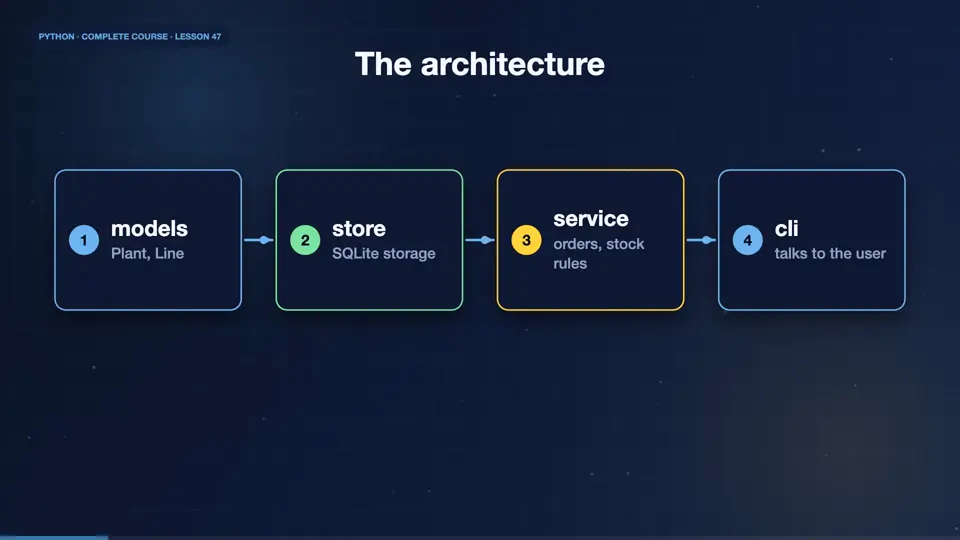
Good projects are built in layers. At the bottom are the models, simple data classes for plants and order lines. Above them, a store handles the database. Above that, a service layer holds the business rules, like checking stock, and applying discounts. At the top, a command line talks to the user. Each layer only knows about the one below.
- modelsPlant, Line
- storeSQLite storage
- serviceorders, stock rules
- clitalks to the user
Layer one: models
The models are dataclasses. A Plant has a name, a price, and a stock count. An order Line holds a plant name, a quantity, and the price at the time of the order, with a property that calculates its total. Notice the type hints, and how short everything is. We test it with one plant, and one line.
from dataclasses import dataclass

@dataclass
class Plant:
    name: str
    price: float
    stock: int = 0

@dataclass
class Line:
    plant: str
    qty: int
    price: float

    @property
    def total(self) -> float:
        return round(self.qty * self.price, 2)

print(Plant("fern", 9.5, 12))
print(Line("fern", 3, 9.5).total)Plant(name='fern', price=9.5, stock=12) 28.5
Layer two: the store
The store wraps SQLite. Add inserts or replaces a plant. Get returns a Plant object, or raises a KeyError, for an unknown name. Set stock updates the quantity. All the SQL lives here, in one place, so the rest of the program never needs to know a database exists. We use the models module from the last step.
import sqlite3
from models import Plant

class Store:
    def __init__(self, path=":memory:"):
        self.db = sqlite3.connect(path)
        self.db.execute("CREATE TABLE IF NOT EXISTS plants (...)")

    def add(self, plant): ...
    def get(self, name): ...
def set_stock(self, name, stock): ...Using the store
Let's use it. We create a store, add two plants, and read one back, as a real Plant object. We update the stock, and read again. Asking for a plant that does not exist raises a KeyError, which we catch. The data layer works, and it is already pleasant to use.
from models import Plant
from store import Store

s = Store()
s.add(Plant("fern", 9.5, 12))
s.add(Plant("ivy", 7.0, 4))
print(s.get("fern"))
s.set_stock("ivy", 10)
print(s.get("ivy").stock)
try:
    s.get("rose")
except KeyError as e:
print("unknown plant:", e)Plant(name='fern', price=9.5, stock=12) 10 unknown plant: 'rose'
Also uses models.py
from dataclasses import dataclass

@dataclass
class Plant:
    name: str
    price: float
    stock: int = 0

@dataclass
class Line:
    plant: str
    qty: int
    price: float

    @property
    def total(self) -> float:
        return round(self.qty * self.price, 2)
Also uses store.py
import sqlite3
from models import Plant

class Store:
    def __init__(self, path=":memory:"):
        self.db = sqlite3.connect(path)
        self.db.execute("CREATE TABLE IF NOT EXISTS plants (name TEXT PRIMARY KEY, price REAL, stock INTEGER)")

    def add(self, plant: Plant):
        self.db.execute("INSERT OR REPLACE INTO plants VALUES (?, ?, ?)", (plant.name, plant.price, plant.stock))
        self.db.commit()

    def get(self, name: str) -> Plant:
        row = self.db.execute("SELECT name, price, stock FROM plants WHERE name = ?", (name,)).fetchone()
        if row is None:
            raise KeyError(name)
        return Plant(*row)

    def set_stock(self, name: str, stock: int):
        self.db.execute("UPDATE plants SET stock = ? WHERE name = ?", (stock, name))
        self.db.commit()
Summary
The foundation is ready. We have models, as dataclasses, and a store that hides the database. In the next part, we add the business rules, with a service layer, protect them with tests, and build the command line.
Key takeaways- Layers: models, store, service, CLI
- Dataclasses for data
- All SQL lives in the store