
Inheritance and Polymorphism
Reuse and extend classes.
Ava now sells more than plants. She sells pots, and gift cards, and gardening tools. They all have a name and a price, but each also has its own special details. Copying the same code into every class would be wasteful. Inheritance lets a new class borrow everything from an existing one, and add its own touch.
- Many products share a name and a price
- Each has special details of its own
- Inheritance: borrow, then extend
A family of classes
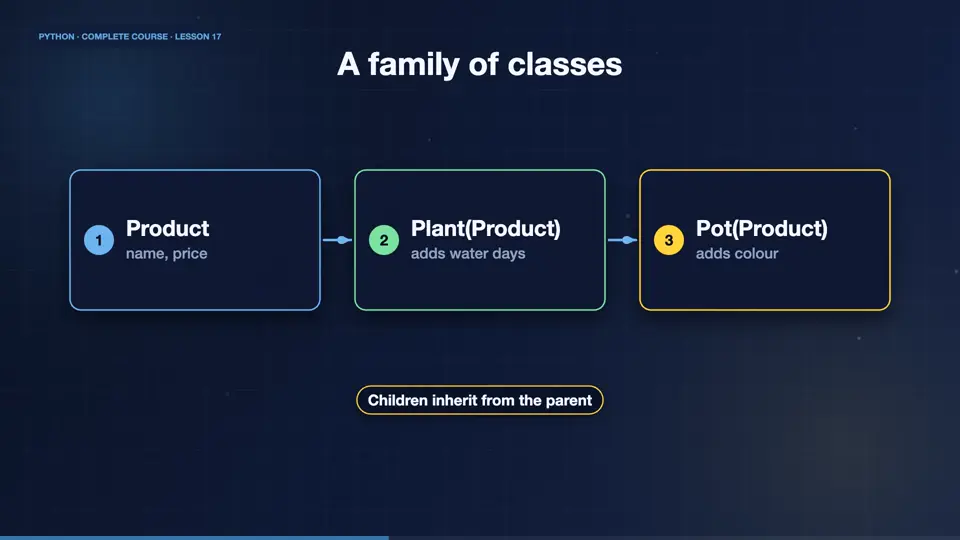
With inheritance, a child class receives the attributes and methods of its parent. The parent Product holds the shared parts, name and price. The children, Plant and Pot, add what is special, like how often to water, or what colour. In a diagram, the arrow points from the child up to its parent.
- Productname, price
- Plant(Product)adds water days
- Pot(Product)adds colour
Subclassing in code
To inherit, put the parent in brackets after the class name. The super function calls the parent's version of a method, so the child can reuse it, and add more. Here Plant calls the Product init to set the name and price, and then stores its own water days. The plant still has every Product method.
class Product:
    def __init__(self, name, price):
        self.name = name
        self.price = price
    def label(self):
        return f"{self.name}: ${self.price}"

class Plant(Product):
    def __init__(self, name, price, water_days):
        super().__init__(name, price)
        self.water_days = water_days

fern = Plant("fern", 9.5, 3)
print(fern.label())
print(fern.water_days)fern: $9.5 3
Overriding methods
A child can override a method, by defining one with the same name. Python then uses the child's version. Here, a gift card describes itself differently from a plain product. Same method name, different behaviour. And the isinstance function tells if an object belongs to a class, or to one of its parents.
class Product:
    def __init__(self, name, price):
        self.name, self.price = name, price
    def describe(self):
        return f"{self.name} costs {self.price}"

class GiftCard(Product):
    def describe(self):
        return f"{self.name}: any plant up to {self.price}"

items = [Product("pot", 6), GiftCard("gift card", 25)]
for it in items:
    print(it.describe())
print(isinstance(items[1], Product))pot costs 6 gift card: any plant up to 25 True
Polymorphism: one call, many forms
The loop you just saw is polymorphism, which means, many forms. The code calls describe on every item, without caring which exact class each one is. Each object does the right thing for its own class. This is what makes big programs flexible, because new types fit in without changing the old code.
Inheritance or composition?
A word of warning. Inheritance models an is a relationship, a plant is a product. But when you mean has a, like a shop has plants, store the objects inside, which is called composition. Beginners often overuse inheritance. A good rule is to prefer composition, and use inheritance only for true is a relationships.
Inheritance (is a)
- Plant is a Product
- shares behaviour
- class Plant(Product)
- use sparingly
Composition (has a)
- Shop has plants
- holds objects inside
- self.plants = []
- usually the better choice
A Tool subclass
Your turn. Take the Product class, and create a subclass called Tool, that also stores a brand. Create a tool, and print its name, price, and brand. Ready? Here is one solution. The child calls super init for the shared data, and stores its own.
Subclass Product as Tool, adding a brand. Create one and print name, price and brand.
Show hint
call super().__init__(name, price)
Show solution
class Product:
    def __init__(self, name, price):
        self.name = name
        self.price = price

class Tool(Product):
    def __init__(self, name, price, brand):
        super().__init__(name, price)
        self.brand = brand

t = Tool("shovel", 18, "GreenCo")
print(t.name, t.price, t.brand)shovel 18 GreenCo
Summary
Great work. Child classes inherit from parents, extend them with super, and override methods to change behaviour. Polymorphism lets one call work on many types. And you know to prefer composition when the relationship is has a. Next, we make our classes feel like built in Python types.
Key takeaways- class Child(Parent), super()
- Override to change behaviour
- Prefer composition for has-a