
Classes and Objects
Model the real world in code.
Ava now tracks plants with a dictionary for the name, another for the price, and a list for the stock. The data for one plant is scattered over three places. In the real world, a plant is one thing, with a name, a price, and behaviours, like being watered. Python lets you model that directly, with classes.
- Data for one plant is scattered everywhere
- In reality, a plant is one thing
- Classes bundle data and behaviour
Class and object
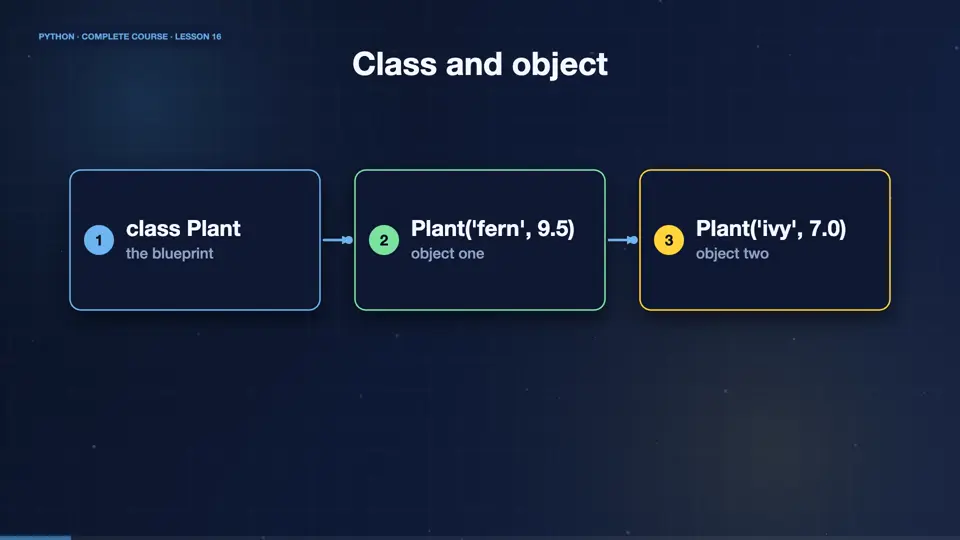
A class is a blueprint, and an object is a thing built from it. Think of a cookie cutter and cookies. The class Plant describes what every plant has, a name and a price, and what every plant can do. Each plant object has its own values. One blueprint, many objects, all independent.
- class Plantthe blueprint
- Plant('fern', 9.5)object one
- Plant('ivy', 7.0)object two
Your first class
Here is a class. The init method runs automatically when you create an object, and sets up its data. The first parameter, self, means this very object, and Python passes it for you. Attributes like self dot name are stored inside the object. Then we create two plants, and read their attributes.
class Plant:
    def __init__(self, name, price):
        self.name = name
        self.price = price

fern = Plant("fern", 9.5)
ivy = Plant("ivy", 7.0)
print(fern.name, fern.price)
print(ivy.name, ivy.price)fern 9.5 ivy 7.0
Adding methods
Methods are functions inside a class, and they receive self, so they can use the object's own data. Here, a plant gets a method that returns a label, and another that applies a discount, and changes its own price. Notice how calling a method reads naturally, object dot method.
class Plant:
    def __init__(self, name, price):
        self.name = name
        self.price = price

    def label(self):
        return f"{self.name}: ${self.price:.2f}"

    def discount(self, percent):
        self.price -= self.price * percent / 100

fern = Plant("fern", 10)
print(fern.label())
fern.discount(20)
print(fern.label())fern: $10.00 fern: $8.00
Each object keeps its own state
The two objects never interfere. Discounting the fern does not change the ivy. Objects also have a default text, when printed, which is unhelpful. The str method lets you decide what print shows. Now print shows a friendly text, and debugging is easier.
class Plant:
    def __init__(self, name, price):
        self.name = name
        self.price = price

    def __str__(self):
        return f"{self.name} (${self.price})"

fern = Plant("fern", 10)
ivy = Plant("ivy", 7)
fern.price = 8
print(fern)
print(ivy)fern ($8) ivy ($7)
Class attributes and a shop class
Some data belongs to the class, and is shared by all objects, like the tax rate. A bigger design is a Shop class, that holds a list of plants, and has methods to add them, and calculate their total value. Classes can contain other objects, which is how real programs are built.
class Plant:
    tax = 0.2
    def __init__(self, name, price):
        self.name, self.price = name, price

class Shop:
    def __init__(self):
        self.plants = []
    def add(self, plant):
        self.plants.append(plant)
    def value(self):
        return sum(p.price for p in self.plants)

shop = Shop()
shop.add(Plant("fern", 9.5))
shop.add(Plant("ivy", 7))
print(shop.value(), Plant.tax)16.5 0.2
A Pot class
Your turn. Create a class called Pot, with a size and a colour. Give it a method called describe, that returns a sentence, like, A large blue pot. Then create one pot, and print its description. Ready? Here is one solution. An init to store, and a method with an f string.
Create class Pot(size, color) with describe() returning "A <size> <color> pot". Print one.
Show hint
__init__ stores, describe() returns
Show solution
class Pot:
    def __init__(self, size, color):
        self.size = size
        self.color = color

    def describe(self):
        return f"A {self.size} {self.color} pot"

print(Pot("large", "blue").describe())A large blue pot
Summary
That is the foundation of object oriented programming. A class is a blueprint, an object is an instance, init sets up the data, self refers to the object, and methods give it behaviour. Next, we learn how classes can build on each other, with inheritance.
Key takeaways- class = blueprint, object = instance
- __init__ and self
- Methods act on the object's data