
Modules, Packages and pip
Organise code, and borrow from the world.
Ava's program is now six hundred lines long. Finding anything in it is hard. And she keeps rewriting things that other people have already built, like sending emails, or reading dates. The answer to both problems is modules. A module is just a Python file that you can import, and thousands are free to download.
- A long file is hard to navigate
- Why rebuild what already exists?
- The tool: modules and packages
Importing from the standard library
Python comes with a huge standard library, often called batteries included. Use import to bring a module in. You can import the whole module, import just a name from it, or give it a short alias with as. Here we use math, random, and the platform independent os module.
import math
from random import choice
import os as operating_system

print(math.pi)
print(choice(["fern", "ivy"]) in ["fern", "ivy"])
print(type(operating_system.getcwd()))3.141592653589793 True <class 'str'>
Writing your own module
Any Python file is a module. Put useful functions in prices dot py, and import them from main dot py. The special check, if name equals main, runs code only when the file is executed directly, and not when it is imported. This is the standard layout of every serious Python file.
import prices

print(prices.add_tax(100))
print(prices.__name__)120.0 prices
Also uses prices.py
def add_tax(p):
    return p * 1.2

if __name__ == "__main__":
    print("running directly")
Packages: folders of modules
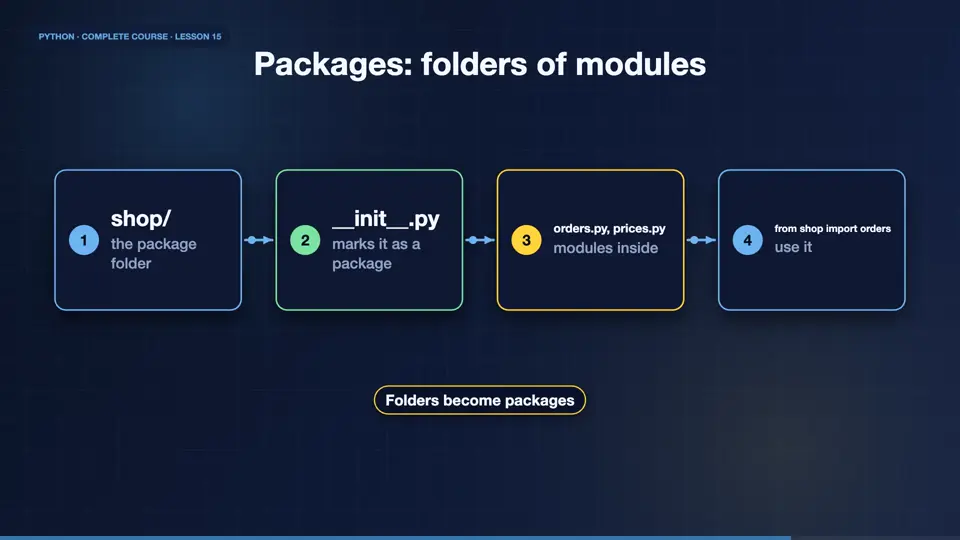
A package is a folder of modules, marked by a file named init dot py. It lets you group related code, like a shop package, with orders, prices, and emails inside. You import with dots, shop dot orders. Python finds modules through a search path, starting with your current folder.
- shop/the package folder
- __init__.pymarks it as a package
- orders.py, prices.pymodules inside
- from shop import ordersuse it
Virtual environments and pip
Other people's packages live on PyPI, the Python Package Index, and pip installs them. But never install into the system Python. Create a virtual environment first, a private folder of packages for one project. Create it with python dash m venv, activate it, then pip install. Each project gets its own versions, and they never clash.
- python -m venv .venvcreate the private space
- activate itsource .venv/bin/activate
- pip install requestsdownload a package
- pip freeze > requirements.txtrecord versions
Using a requirements file
A requirements file lists the packages a project needs, one per line. Anyone can recreate your environment with pip install dash r requirements dot txt. Pin versions, so that today's code still works next year. Keep the file in your project, with the code, and share it with your team. Reproducibility is a professional habit.
Your own helper module
Your turn. Create a module that holds a function called greet, which returns a greeting for a name. Then import it in another file, and print the result. Ready? Here is one solution. The module defines the function, and the main file imports and calls it.
Put greet(name) in helpers.py, then import and use it from another file.
Show hint
import helpers, then helpers.greet(...)
Show solution
import helpers

print(helpers.greet("Ava"))Welcome, Ava!
Summary
Excellent progress. You can now organise code into modules and packages, import from the standard library, and install other people's work with pip, inside a virtual environment. That completes our tour of the core language. Next, we meet the idea that changes everything, classes and objects.
Key takeaways- import, from, as
- A module is a file, a package is a folder
- venv + pip + requirements.txt