
Lists and Tuples
Keep many things in one place.
Ava does not have three plants. She has hundreds. Making one variable for each of them would be impossible. She needs one container that holds many items, in order, and that she can add to or remove from whenever stock changes. Python calls that a list.
- The problem: hundreds of plants, one variable each?
- The idea: one container, many items
- The tool: the list
A list is a row of boxes
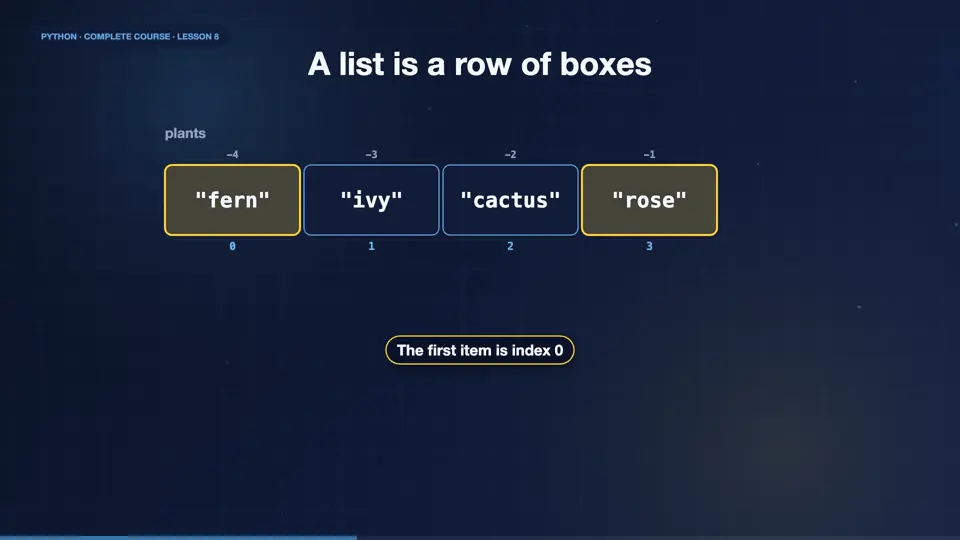
A list is an ordered row of values, written in square brackets, separated by commas. Each item has an index, starting at zero, exactly like a string. So the first plant is index zero, and the last one is minus one. Lists can hold anything, even a mix of types.
Reading a list
Let's read a list in the REPL. The len function counts the items. Indexing picks one item, and slices pick a range, just like strings. The in operator checks whether an item is present. And a list can be sorted, or reversed, in one call.
Changing a list
Unlike strings, lists can be changed. Append adds an item to the end. Insert puts an item at a position. Remove deletes by value, and pop deletes by position, and returns the removed item. You can even assign to an index to replace an item. This ability to change is called mutability.
A simple stock list
Now a small program. Ava keeps her stock in a list, and receives a new delivery. She appends the new plants, removes the sold out one, then prints the list. We loop through it with enumerate, which gives both the position and the item, and we pass one to start counting from one.
stock = ["fern", "ivy"]
stock.append("cactus")
stock.extend(["rose", "tulip"])
stock.remove("ivy")
for n, item in enumerate(stock, 1):
    print(n, item)
print("Items:", len(stock))1 fern 2 cactus 3 rose 4 tulip Items: 4
Useful list tools
Python lists come with many tools. Sort puts items in order, and reverse flips them. Count tells how often a value appears, and index finds a position. The functions sum, min and max work on number lists. And list slicing with a step copies a list. Remember that two names can point at the same list, so use copy when you need a separate one.
Lists or tuples?
Python has a cousin of the list, called a tuple. It uses round brackets, and once created, it cannot be changed. Use a list for things that grow and shrink, like stock. Use a tuple for fixed groups, like a position, or a price and a name. Tuples are faster, and they protect data from accidents. You can also unpack a tuple into several variables in one line.
list [ ]
- changeable
- append, remove, sort
- stock, orders, names
tuple ( )
- fixed forever
- safe and fast
- coordinates, records
Unpacking and tuples
Here is a tuple holding a plant name, and its price. Unpacking spreads the values into two variables at once. Python can even swap two variables in a single line, without a helper. And a list can hold tuples, so each record stays together.
item = ("monstera", 24.99)
name, price = item
print(name, price)
a, b = 1, 2
a, b = b, a
print(a, b)
orders = [("fern", 9.5), ("ivy", 7.0)]
for n, p in orders:
print(n, p)monstera 24.99 2 1 fern 9.5 ivy 7.0
Top three bestsellers
Your turn. You have a list of monthly sales numbers. Sort it, biggest first, and print the top three. Ready? Here is one solution. Sorted with reverse equals True, then a slice of the first three items. Short, and readable.
Sort the sales list from biggest to smallest and print the top three.
Show hint
sorted(..., reverse=True) and a slice
Show solution
sales = [120, 340, 95, 410, 220, 180]
best = sorted(sales, reverse=True)
print(best[:3])[410, 340, 220]
Summary
Well done. Lists store many items in order, they are changeable, and you can add, remove, slice and sort them. Tuples are the fixed cousins, ideal for records. Unpacking spreads values into variables. Next, Ava needs to look things up by name, and that calls for dictionaries.
Key takeaways- Lists: ordered and changeable
- Tuples: ordered and fixed
- Unpacking: a, b = pair