
Web APIs and JSON
Talk to the rest of the internet.
Ava wants to show live weather on her shop page, because plants love rain. Weather services share data through APIs. An API is like a restaurant menu, with a waiter. You do not walk into the kitchen. You ask the waiter for a dish, in a standard way, and you get the dish back. In Python, that request takes just a few lines.
- Weather data lives on another computer
- An API: ask in a standard way
- Get the answer back as JSON
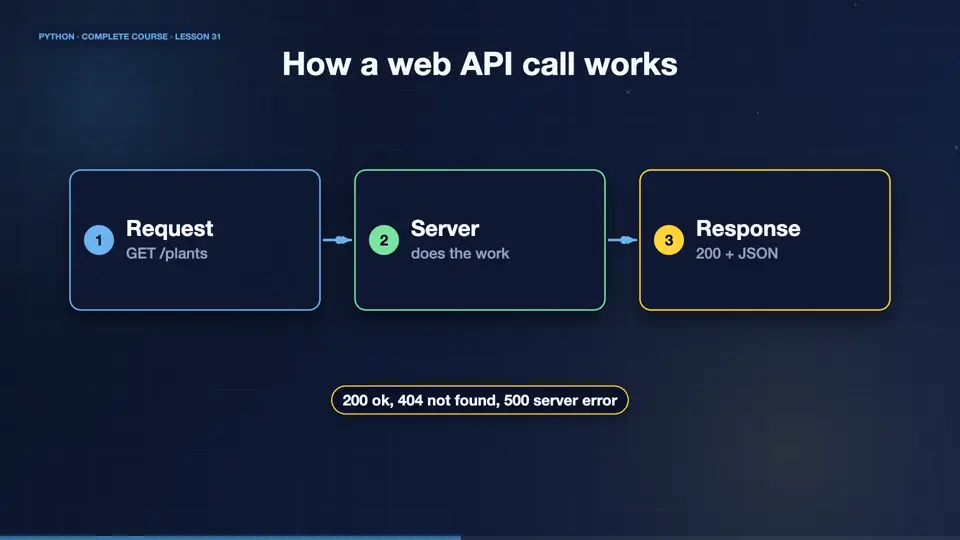
How a web API call works
Your program sends an HTTP request to a URL. The server replies with a status code, and a body, often in JSON. A status of two hundred means success, four oh four means not found, and five hundred means the server failed. The main verbs are get to read, post to create, put to update, and delete to remove.
- RequestGET /plants
- Serverdoes the work
- Response200 + JSON
Calling an API
To keep this reliable, we start a tiny local server, inside the script, that behaves like a real shop API. Then we call it with urllib from the standard library. We read the status and the body, and parse the JSON into Python data. A real call to any web service works exactly the same way.
import json, threading, urllib.request
from http.server import BaseHTTPRequestHandler, HTTPServer

class Api(BaseHTTPRequestHandler):
    def do_GET(self):
        body = json.dumps({"plants": ["fern", "ivy"], "open": True}).encode()
        self.send_response(200)
        self.send_header("Content-Type", "application/json")
        self.end_headers()
        self.wfile.write(body)
    def log_message(self, *a): pass

server = HTTPServer(("127.0.0.1", 0), Api)
threading.Thread(target=server.serve_forever, daemon=True).start()
url = f"http://127.0.0.1:{server.server_port}/plants"

with urllib.request.urlopen(url) as r:
    print(r.status)
    data = json.load(r)
print(data["plants"], data["open"])
server.shutdown()200 ['fern', 'ivy'] True
The requests library
In real projects, most people use the requests library. You install it with pip. Then requests dot get returns a response, with a status code, and a json method that parses the body. You can pass query parameters, headers, and timeouts. Always set a timeout, so your program never waits forever, and always check the status before using the data.
Working with JSON data
JSON maps neatly to Python. Objects become dictionaries, arrays become lists, and null becomes None. Dumps turns Python into a string, and loads parses a string. Here, Ava reads an API style response, picks out the fields, and builds a summary. Handling nested data is just dictionaries and lists, which you already know.
import json

text = '{"city": "Leeds", "temp": 14.5, "rain": true, "days": [{"d": "Mon", "mm": 0}, {"d": "Tue", "mm": 6}]}'
data = json.loads(text)
print(data["city"], data["temp"], data["rain"])
wet = [d["d"] for d in data["days"] if d["mm"] > 0]
print("Rainy days:", wet)
print(json.dumps({"ok": True, "n": None}))Leeds 14.5 True
Rainy days: ['Tue']
{"ok": true, "n": null}Parse a response
Your turn. A text holds JSON with a list of prices. Parse it with json loads, and print the total of the prices. Ready? Here is one solution. Loads turns the text into a dictionary, and sum adds the list.
Parse the JSON text and print the sum of the prices list.
Show hint
json.loads(text)["prices"]
Show solution
import json

text = '{"prices": [9.5, 7.0, 11.0]}'
data = json.loads(text)
print(sum(data["prices"]))27.5
Summary
Excellent. You understand requests and responses, status codes, the main HTTP verbs, and how to turn JSON into Python data. Next, Ava wraps her tools in a proper command line program, with arguments, that anyone can run.
Key takeaways- HTTP: GET, POST, PUT, DELETE
- 200 ok, 404 not found, 500 error
- requests.get(...).json()