
Training Pipelines
One command, whole workflow.
So far, we ran steps one by one. Prepare the data, then train, then evaluate. By hand, that is slow, and easy to get wrong. A pipeline describes the steps, and the order, so that one command runs everything, and, more cleverly, only reruns what changed. Let's build one with D V C.
- Steps run by hand are fragile
- A pipeline describes the steps
- Only what changed is rerun
A pipeline is a graph
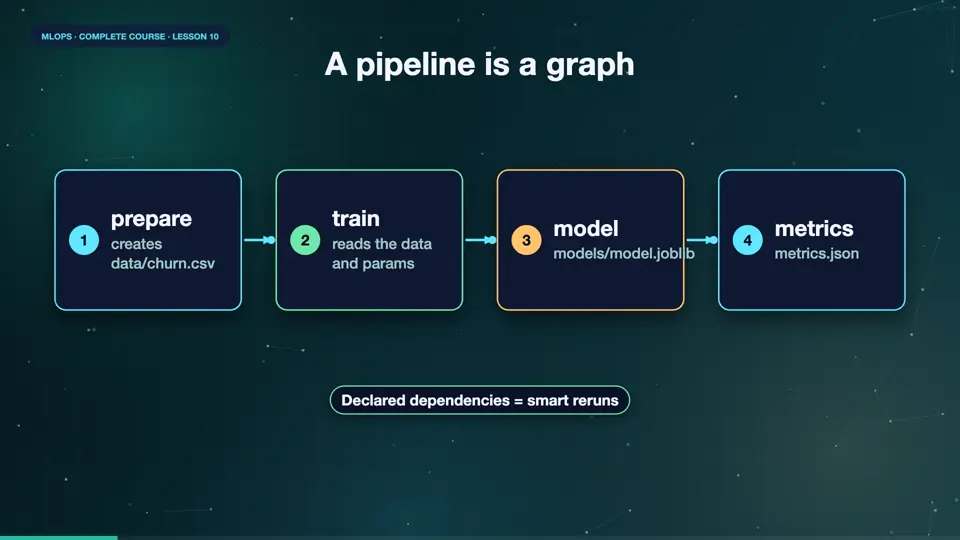
A pipeline is a graph of stages. Each stage has a command, the files it reads, called dependencies, and the files it creates, called outputs. The output of one stage is the input of the next. Our pipeline has two stages. Prepare creates the data file. Train reads that file, and the parameters, and creates a model, and a metrics file. Because dependencies are declared, the tool knows exactly which stages are affected by any change.
- preparecreates data/churn.csv
- trainreads the data and params
- modelmodels/model.joblib
- metricsmetrics.json
The pipeline file
Here is the pipeline file. Under stages, the first stage is prepare. Its command runs our script. It depends on the script. And it produces the data file. The second stage, train, depends on its script, and on the data file, which prepare creates. It also depends on the train section of the parameters file. Its outputs are the model, and a metrics file. That is the whole description. No scheduling code, just facts.
stages:
  prepare:
    cmd: python src/prepare.py
    deps:
    - src/prepare.py
    outs:
    - data/churn.csv
  train:
    cmd: python src/train.py
    deps:
    - src/train.py
    - data/churn.csv
    params:
    - train
    outs:
    - models/model.joblib
    metrics:
    - metrics.json:
cache: falseRun it, then change one thing
Let's run it. One command, repro, runs the stages in order. Prepare writes the data, and train fits the model, and prints its accuracy. Run it again, and nothing happens, both stages are skipped, because nothing changed. Now we change one parameter, the depth of the trees, and run the experiment. Look carefully. Prepare is skipped, because its inputs are the same. Only the train stage runs again. Then we compare the metrics with the last commit. The pipeline saved time, and recorded exactly what changed.
dvc repro 2>&1 | grep -E 'Running|accuracy'
Running stage 'prepare':
Running stage 'train':
accuracy 0.865
dvc repro 2>&1 | tail -1
Data and pipelines are up to date.
git add -A && git commit -qm 'pipeline v1'
dvc exp run -S train.max_depth=8 2>&1 | grep -E 'skipping|accuracy'
Stage 'prepare' didn't change, skipping
accuracy 0.863
dvc metrics diff --no-path
Metric    HEAD    workspace    Change
accuracy  0.865   0.863        -0.002
File used: src/churn.py
import numpy as np, pandas as pd

def make_data(n, seed, shifted=False):
    rng = np.random.default_rng(seed)
    tenure = rng.integers(1, 72, n)
    charges = rng.normal(65 + (28 if shifted else 0), 18, n).clip(20, 140).round(2)
    calls = rng.poisson(1.5 + (1.5 if shifted else 0), n)
    contract = rng.choice([0, 1, 2], n, p=[.55, .25, .20] if not shifted else [.30, .30, .40])
    logit = -1.0 - 0.04 * tenure + 0.025 * (charges - 65) + 0.45 * calls - 0.8 * contract
    if shifted:
        logit = -0.2 - 0.01 * tenure - 0.01 * (charges - 65) + 0.2 * calls - 0.2 * contract
    churn = (rng.random(n) < 1 / (1 + np.exp(-logit))).astype(int)
    return pd.DataFrame({"tenure": tenure, "charges": charges, "calls": calls, "contract": contract, "churn": churn})
File used: src/prepare.py
from churn import make_data

make_data(3000, seed=1).to_csv("data/churn.csv", index=False)
print("prepared 3000 rows")
File used: src/train.py
import json, joblib, yaml, pandas as pd
from sklearn.ensemble import RandomForestClassifier
from sklearn.metrics import accuracy_score
from sklearn.model_selection import train_test_split

params = yaml.safe_load(open("params.yaml"))["train"]
df = pd.read_csv("data/churn.csv")
X, y = df.drop(columns="churn"), df["churn"]
Xtr, Xte, ytr, yte = train_test_split(X, y, test_size=0.25, random_state=0)

model = RandomForestClassifier(**params, random_state=0).fit(Xtr, ytr)
accuracy = accuracy_score(yte, model.predict(Xte))
joblib.dump(model, "models/model.joblib")
json.dump({"accuracy": round(accuracy, 3)}, open("metrics.json", "w"))
print("accuracy", round(accuracy, 3))
File used: params.yaml
train:
  n_estimators: 50
  max_depth: 3
File used: dvc.yaml
stages:
  prepare:
    cmd: python src/prepare.py
    deps:
    - src/prepare.py
    outs:
    - data/churn.csv
  train:
    cmd: python src/train.py
    deps:
    - src/train.py
    - data/churn.csv
    params:
    - train
    outs:
    - models/model.joblib
    metrics:
    - metrics.json:
        cache: false
Summary
Excellent. A pipeline declares stages, dependencies, and outputs. One command runs it, and only the affected stages are rerun. Next, what happens when pipelines must run on a schedule, with retries and alerts, orchestration.
Key takeaways- Stages: cmd, deps, outs
- dvc repro runs only what changed
- Metrics and params are tracked