
Feature Stores
One definition, two uses.
We met feature stores briefly. Now we see why teams adopt them. They solve three problems at once. Point in time correct training data, the same features in training and serving, and fast lookups, when a prediction is needed in milliseconds. Let's see how one is defined, and used.
- Correct training data
- Same features in serving
- Fast lookups
A feature definition
Here is a feature definition, in the style of Feast. An entity names the thing we describe, a customer, with its key. A source says where the raw feature values live, with a timestamp column. And a feature view lists the features, support calls in thirty days, and average monthly charge, with their types. The time to live says how long a value stays valid. From this one definition, the store can build correct training sets, using point in time joins, and serve the latest values, for live predictions. Define once, use twice.
from datetime import timedelta
from feast import Entity, FeatureView, Field, FileSource
from feast.types import Float32, Int64

customer = Entity(name="customer", join_keys=["customer_id"])

source = FileSource(path="data/customer_stats.parquet", timestamp_field="event_time")

customer_stats = FeatureView(
    name="customer_stats",
    entities=[customer],
    ttl=timedelta(days=2),
    schema=[
        Field(name="support_calls_30d", dtype=Int64),
        Field(name="avg_monthly_charge", dtype=Float32),
    ],
    source=source,
)
Offline and online stores
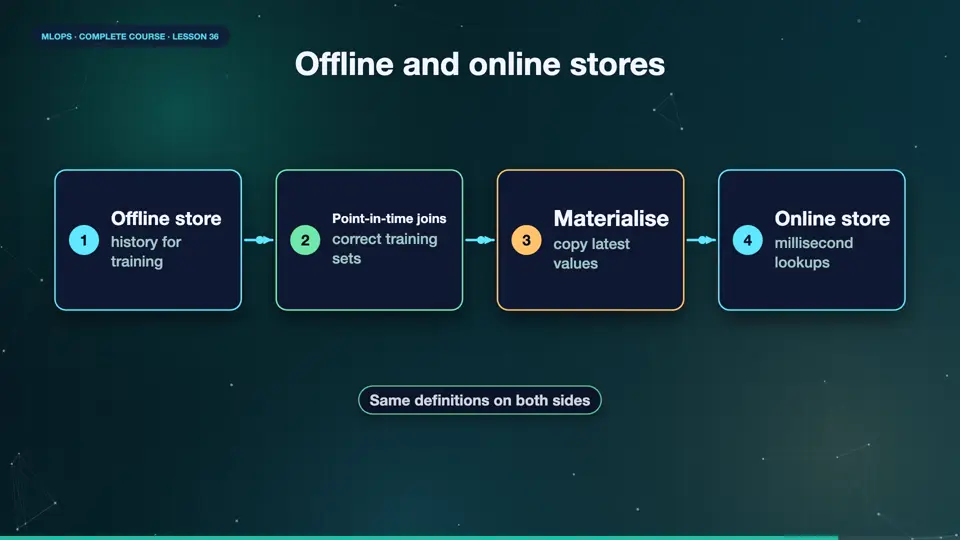
The store has two sides. The offline store holds the full history, in files, or a warehouse. Training jobs read from it, and the store performs the point in time joins. The online store holds only the latest value of each feature, in a very fast database, like Redis. The live service reads from it, in a few milliseconds. A materialisation job copies the freshest values, from offline to online, on a schedule, or from a stream. Both stores use the same definitions, so the numbers always agree.
- Offline storehistory for training
- Point-in-time joinscorrect training sets
- Materialisecopy latest values
- Online storemillisecond lookups
Do you need one?
Not every team needs a feature store. If you have one model, and a handful of features, a pipeline and careful code are enough. If many teams reuse the same features, if you need millisecond serving of precomputed features, or if skew and leakage have already bitten you, a feature store pays off. Start simple, document your features, and adopt a store when the pain is real. It is a tool for scale, not a requirement for good practice.
| Situation | Verdict |
|---|---|
| One model, few features | pipeline code is enough |
| Many teams share features | a feature store pays off |
| Millisecond online features | a feature store helps |
| Skew or leakage keeps happening | adopt one, define features once |
Summary
Wonderful. A feature store defines features once, builds point in time correct training sets, and serves the latest values quickly. Adopt one when the pain is real. Next, making models faster, smaller, and cheaper, optimisation for production.
Key takeaways- Entity, source, feature view
- Offline for training, online for serving
- Adopt when the pain is real