
From MLOps to LLMOps
What changes with language models.
Large language models changed how many teams build with machine learning. You often do not train a model at all. You write prompts, connect documents, and call a model through an A P I. Yet everything you learned about operations still applies, with some new twists. In this lesson, we map the differences.
- Often no training at all
- Prompts and retrieval are the code
- The same operations ideas apply
Classic ML versus LLM apps
Let's compare the two worlds. In classic machine learning, you train a model on your own data, and the main artifacts are data, features, and models. Quality is a number, like accuracy. Costs are mostly training and serving machines. In L L M apps, you often use a model somebody else trained. The main artifacts are prompts, retrieved documents, and model versions. Quality is harder, because answers are free text. And cost is counted in tokens, for every single call. The loop of build, evaluate, deploy, and monitor remains. Only the parts are different.
Classic ML
- Train on your own data
- Artifacts: data, features, model
- Quality: a number like accuracy
- Cost: machines for training and serving
LLM apps
- Use a pre-trained model
- Artifacts: prompts, documents, versions
- Quality: judged free text
- Cost: tokens on every call
The LLM application loop
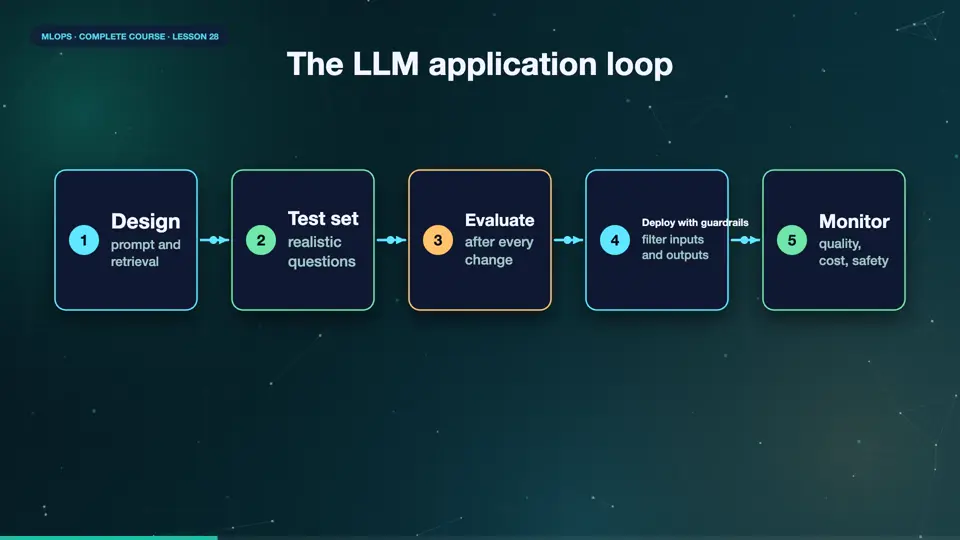
The L L M life cycle has its own shape. You design a prompt, and, if needed, retrieval of your own documents. You build a test set of realistic questions, with expected behaviour. You evaluate the application against it, after every change. You deploy behind guardrails, that filter unsafe inputs and outputs. And you monitor real conversations, for quality, cost, and safety. What you learn from them, improves the prompts, the documents, and the test set. Evaluation is at the centre of this loop.
- Designprompt and retrieval
- Test setrealistic questions
- Evaluateafter every change
- Deploy with guardrailsfilter inputs and outputs
- Monitorquality, cost, safety
New problems to manage
A few problems are new. Hallucinations, confident answers that are simply wrong. Prompt injection, where a user, or a document, tries to give the model new orders. Non determinism, the same prompt can give different answers. Model version changes by the provider, which can silently change behaviour. Latency, because large models are slow. And cost, because long prompts and long answers add up quickly. Each of these needs a plan, and the next lessons give you one.
Summary
Good. L L M apps swap training for prompts and retrieval, and quality is judged on free text, so evaluation becomes the centre. New risks include hallucination, injection, and cost. Next, treating prompts like code, versioned, tested, and reviewed.
Key takeaways- Prompts and retrieval are the artifacts
- Evaluation is central
- New risks: hallucination, injection, cost