
Containers for ML
One image, runs anywhere.
The model works on your machine. But your machine has the right Python, the right libraries, and the right files. A server does not. Containers solve this, by packaging the model, and everything it needs, into one image that runs the same everywhere. You may know Docker already. Here is how it applies to machine learning.
- Works on my machine is not enough
- Package the model with its environment
- Run the same image everywhere
From model to image
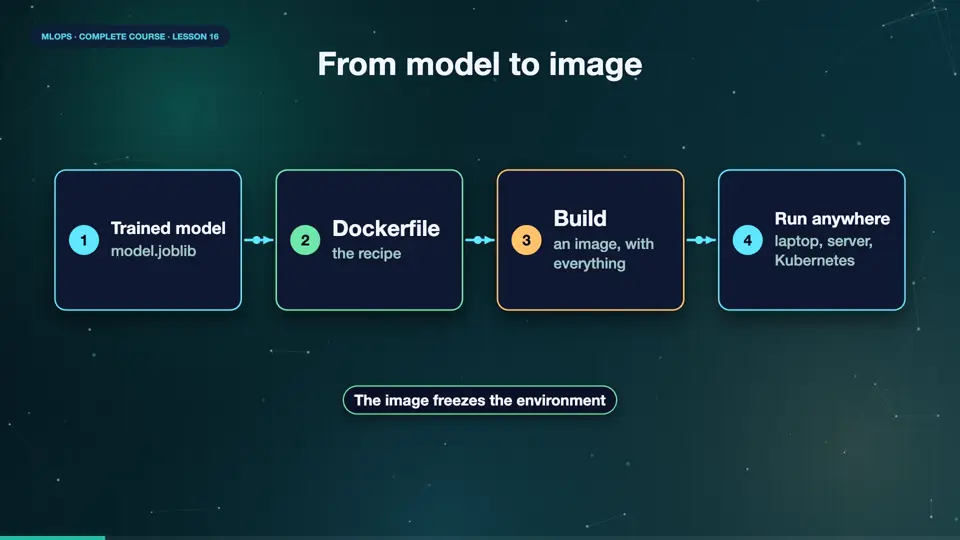
The packaging has a clear path. You start with a trained model file. You write a small recipe, called a Dockerfile, that begins with a base image, installs pinned libraries, and copies in the code and the model. Docker builds an image from the recipe. You can run that image on your laptop, on a test server, or in Kubernetes, and it behaves identically. The image is also a perfect thing to version, and to store in a registry, next to the model itself.
- Trained modelmodel.joblib
- Dockerfilethe recipe
- Buildan image, with everything
- Run anywherelaptop, server, Kubernetes
A Dockerfile for the model
Here is the recipe. It starts from a slim Python image. It sets a working folder. It copies the requirements file first, and installs the pinned libraries, which Docker caches, so rebuilds are fast when only code changes. Then it copies the code, and the model file. It declares port eight thousand, and the command that starts the web service. The pinned versions matter, because a model saved with one version of scikit learn, should be loaded with the same one.
FROM python:3.12-slim
WORKDIR /app
COPY requirements.txt .
RUN pip install --no-cache-dir -r requirements.txt
COPY app.py churn.py model.joblib ./
EXPOSE 8000
CMD ["uvicorn", "app:app", "--host", "0.0.0.0", "--port", "8000"]
Build and run
Let's build it. Docker reads the recipe, and creates the image, which takes under a minute, mostly for installing the libraries. We list the image, and its size. Machine learning images are often large, because the libraries are big, which is why people use slim bases, and multi stage builds. Now we start a container from it, and map a port. A moment later, the health check answers. The model is running in a container, ready for anywhere.
docker build -q -t churn-api:1 .
sha256:1feffd4b5647c912b80423cbfe7f0275100a4e9fe55b57890c473f7d273b62ef
docker images churn-api --format '{{.Repository}}:{{.Tag}}  {{.Size}}'
churn-api:1  728MB
docker run -d --name churn -p 8100:8000 churn-api:1 | cut -c1-12
04e4fc95b44a
curl -s localhost:8100/health
{"status":"ok"}
File used: churn.py
import numpy as np, pandas as pd

def make_data(n, seed, shifted=False):
    rng = np.random.default_rng(seed)
    tenure = rng.integers(1, 72, n)
    charges = rng.normal(65 + (28 if shifted else 0), 18, n).clip(20, 140).round(2)
    calls = rng.poisson(1.5 + (1.5 if shifted else 0), n)
    contract = rng.choice([0, 1, 2], n, p=[.55, .25, .20] if not shifted else [.30, .30, .40])
    logit = -1.0 - 0.04 * tenure + 0.025 * (charges - 65) + 0.45 * calls - 0.8 * contract
    if shifted:
        logit = -0.2 - 0.01 * tenure - 0.01 * (charges - 65) + 0.2 * calls - 0.2 * contract
    churn = (rng.random(n) < 1 / (1 + np.exp(-logit))).astype(int)
    return pd.DataFrame({"tenure": tenure, "charges": charges, "calls": calls, "contract": contract, "churn": churn})
File used: train_model.py
import joblib
from sklearn.linear_model import LogisticRegression
from churn import make_data

df = make_data(3000, seed=1)
model = LogisticRegression(max_iter=500).fit(df.drop(columns="churn"), df["churn"])
joblib.dump(model, "model.joblib")
File used: app.py
import joblib
import pandas as pd
from fastapi import FastAPI
from pydantic import BaseModel

model = joblib.load("model.joblib")
app = FastAPI(title="Churn API")


class Customer(BaseModel):
    tenure: int
    charges: float
    calls: int
    contract: int


@app.get("/health")
def health():
    return {"status": "ok"}


@app.post("/predict")
def predict(customer: Customer):
    row = pd.DataFrame([customer.model_dump()])
    probability = float(model.predict_proba(row)[0][1])
    return {"churn_probability": round(probability, 3), "model_version": "1"}
File used: requirements.txt
fastapi==0.162.0
joblib==1.6.0
numpy==2.5.4
pandas==3.1.0
pydantic==2.14.2
scikit-learn==1.9.1
uvicorn==0.54.0
File used: Dockerfile
FROM python:3.12-slim
WORKDIR /app
COPY requirements.txt .
RUN pip install --no-cache-dir -r requirements.txt
COPY app.py churn.py model.joblib ./
EXPOSE 8000
CMD ["uvicorn", "app:app", "--host", "0.0.0.0", "--port", "8000"]Container tips for ML
A few tips. Pin every library version. Use a slim base image, and install only what serving needs, training libraries can stay out. Never bake secrets into an image. Keep the model file outside the image, when it changes often, and download it at start, from the registry. Run as a non root user. And scan images for known vulnerabilities, as part of your pipeline.
Summary
Good. A Dockerfile packages the model, with pinned libraries, into an image that runs identically everywhere. Keep images slim, pinned, and free of secrets. Next, what runs inside the container, a web service that answers prediction requests.
Key takeaways- Dockerfile: base, install, copy, run
- Pin versions to match training
- Slim images, no secrets