
Streaming Features
Data that never stops.
Some features are not about yesterday. They are about the last five minutes. How many failed payments, how many support calls, how many pages viewed. To compute them, a system must process events as they arrive, in a stream. In this lesson, you will see the core trick, the sliding window, and the operations it creates.
- Features about the last minutes
- Events arrive continuously
- The sliding window
A sliding window
Here is the core trick, in a few lines. We have a small stream of events, each with a time in seconds, and a type. We want one feature, the number of support calls in the last five minutes. We keep a queue of recent call times. When a call arrives, we add its time. Then, for every event, we drop the times that are older than the window. And we print the count. Watch the numbers. The count grows with each call, then falls, at four hundred and twenty seconds, when the oldest calls slide out of the window. The feature always describes the recent past.
from collections import deque

events = [(0, "call"), (40, "call"), (100, "login"), (130, "call"),
          (290, "call"), (420, "call"), (430, "call"), (445, "call")]
WINDOW = 300

recent_calls = deque()
for second, kind in events:
    if kind == "call":
        recent_calls.append(second)
    while recent_calls and recent_calls[0] <= second - WINDOW:
        recent_calls.popleft()
print(f"t={second:4d}s {kind:5s} support calls in the last 5 minutes: {len(recent_calls)}")t= 0s call support calls in the last 5 minutes: 1 t= 40s call support calls in the last 5 minutes: 2 t= 100s login support calls in the last 5 minutes: 2 t= 130s call support calls in the last 5 minutes: 3 t= 290s call support calls in the last 5 minutes: 4 t= 420s call support calls in the last 5 minutes: 3 t= 430s call support calls in the last 5 minutes: 3 t= 445s call support calls in the last 5 minutes: 4
A streaming architecture
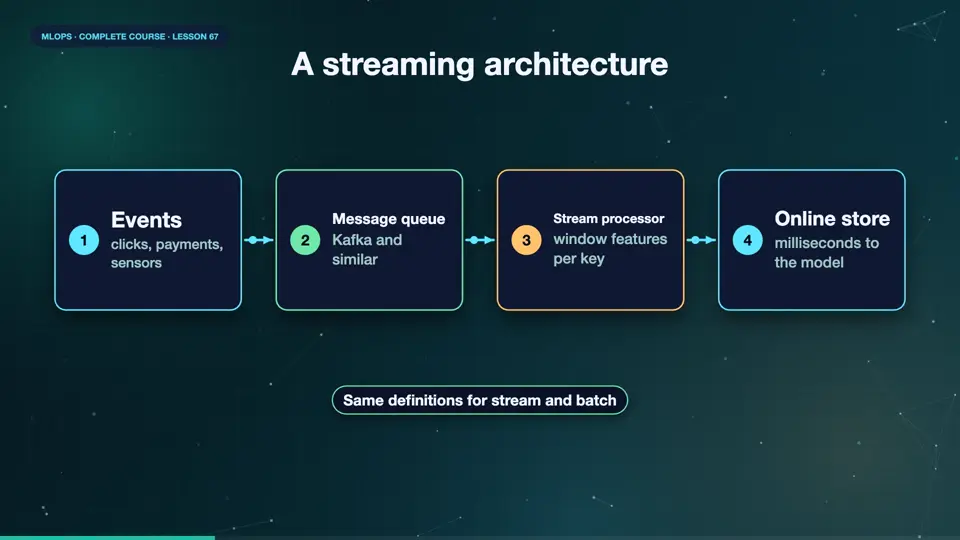
In production, the same idea runs at scale. Events, clicks, payments, sensor readings, are written to a message queue, such as Kafka. A stream processor, like Flink, or Spark Streaming, reads them, and maintains the window features, for millions of keys. It writes the fresh values to the online feature store, where the model service reads them in milliseconds. And it also writes the events to storage, so that training can use the same logic, later. The same definitions, in the stream, and in the batch, keep training and serving consistent.
- Eventsclicks, payments, sensors
- Message queueKafka and similar
- Stream processorwindow features per key
- Online storemilliseconds to the model
Streaming gotchas
Streams have their own traps. Late events, which arrive after their window closed, so decide how long to wait. Out of order events, because networks reorder messages. Duplicates, because retries resend messages, so make operations idempotent. Back pressure, when the processor cannot keep up, and the queue grows, which you must monitor. And state, windows need memory, and must survive restarts, through checkpoints. Start with batch features, and add streaming only where freshness truly pays.
Summary
Good. Streaming features use sliding windows over events, computed by a stream processor, and served from an online store. Handle late events, duplicates, and lag, and add streaming only when freshness pays. Next, getting more value from every label you pay for, with active learning.
Key takeaways- Sliding windows over events
- Queue, processor, online store
- Late data, duplicates, lag