
Project: Making the Fix
A branch and a pull request.
Now the actual fix. Always on a new branch, never on main, even in your own fork. That keeps main clean, so it can always match the original project.
- Always a new branch
- Never on main
- Main stays in sync
Fix, commit, push
We already created a branch called fix typo, and in our editor, we corrected the word, and saved. Status confirms we're on the branch, with tips dot MD modified. Diff shows the one changed line. Commit with a clear message, and push the branch to our fork.
git status --short --branch
## fix-typo
 M tips.md
git diff
diff --git a/tips.md b/tips.md
index ddeaa13..7dd974a 100644
--- a/tips.md
+++ b/tips.md
@@ -1,2 +1,2 @@
 - Commit often
-- Wirte clear messages
+- Write clear messages
git commit -am "Fix typo in tips list"
[fix-typo f28d95f] Fix typo in tips list
 1 file changed, 1 insertion(+), 1 deletion(-)
git push -u origin fix-typo
To https://github.com/sam/awesome-tips.git
 * [new branch]      fix-typo -> fix-typo
branch 'fix-typo' set up to track 'origin/fix-typo'.
Opening the pull request
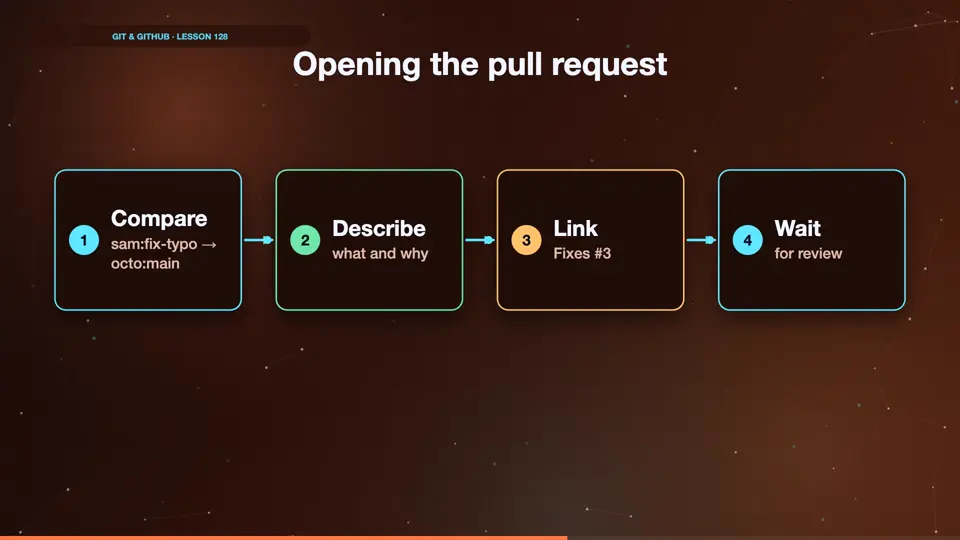
On GitHub, we open a pull request from sam's fix typo branch, into octo's main. In the description, we write what we changed, and add fixes, followed by the issue number, so the issue closes when it's merged. Then we wait patiently for a maintainer to review it.
- Comparesam:fix-typo → octo:main
- Describewhat and why
- LinkFixes #3
- Waitfor review
Summary
Branch, fix, push to your fork, and open a pull request with fixes and the issue number. Next, what happens after it's merged.
Key takeaways- git switch -c fix-typo
- Push to your fork
- PR with 'Fixes #3'