
GitHub Pages
A free website.
Our project is a website. GitHub can host it for you, for free, straight from your repository. It's called GitHub Pages, and every push updates the live site.
- Free hosting from GitHub
- Straight from your repository
- Every push updates it
Turning on Pages
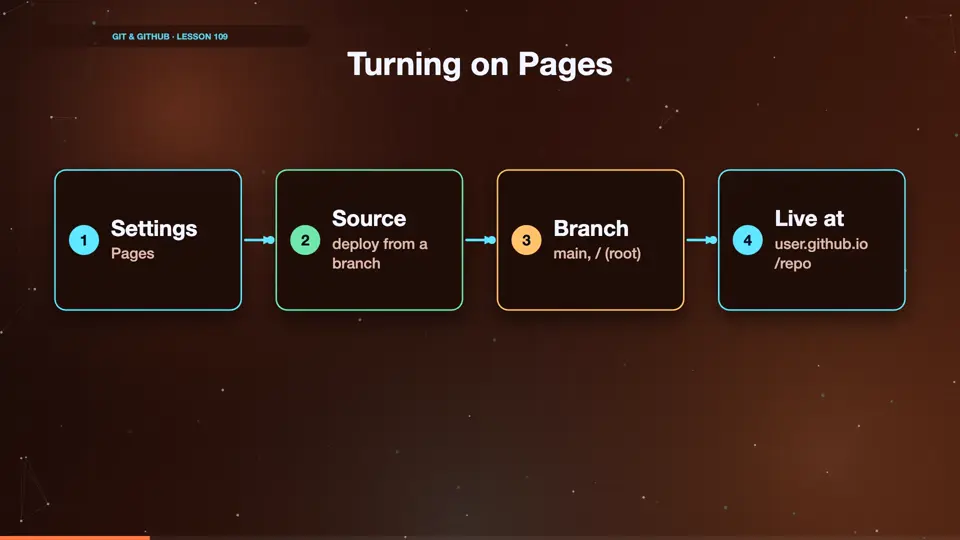
Open your repository on GitHub, and go to settings, then pages. Under source, choose deploy from a branch. Pick main, and the root folder, and save. After a minute, GitHub shows your site's address. It's your username, dot github dot io, slash the repository name.
- SettingsPages
- Sourcedeploy from a branch
- Branchmain, / (root)
- Live atuser.github.io /repo
Updating the live site
From now on, publishing is just a push. We change the welcome text, commit, and push. A minute later, the live site shows the new text. Your Git history is now your deployment history too.
echo '<p>Now live on GitHub Pages!</p>' >> index.html
git commit -am "Announce the live site"
[main 262fca7] Announce the live site
 1 file changed, 1 insertion(+)
git push
To https://github.com/sam/my-site.git
   f63a17a..262fca7  main -> main
Summary
GitHub Pages hosts a static site from your repository for free, and every push updates it. Next, robots that run on every push. GitHub Actions.
Key takeaways- Settings, Pages
- Deploy from main
- Push to publish