
Forks
Your own copy of any project.
You can't push to someone else's repository. So how do people contribute to open source projects? With a fork. A fork is your own copy of someone else's repository, on your GitHub account.
- You can't push to their repo
- So you make a fork
- Your own copy, on your account
The fork workflow
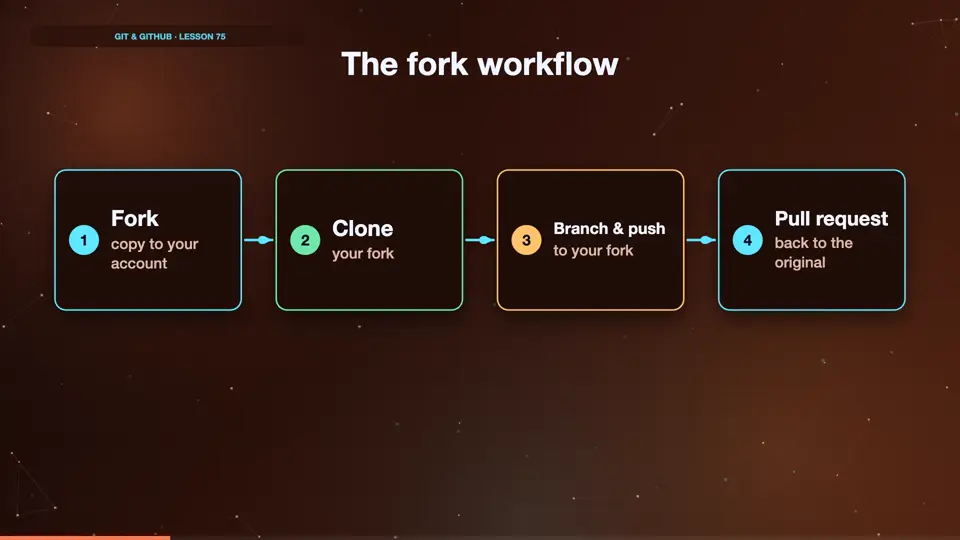
Here's the whole flow. Click fork on GitHub, to copy the project to your account. Clone your fork to your computer. Make a branch, commit, and push to your fork. Then open a pull request, from your fork, back to the original project.
- Forkcopy to your account
- Cloneyour fork
- Branch & pushto your fork
- Pull requestback to the original
Clone your fork
We forked a project called awesome tips, from the octo account. Now we clone our fork, from our own account, sam. Inside, origin points to our fork. That's where we're allowed to push.
cd ..
git clone https://github.com/sam/awesome-tips.git
Cloning into 'awesome-tips'...
done.
cd awesome-tips
git remote -v
origin  https://github.com/sam/awesome-tips.git (fetch)
origin  https://github.com/sam/awesome-tips.git (push)
Summary
A fork is your own copy of a project on GitHub. You push to your fork, then open a pull request to the original. Next, keeping your fork up to date.
Key takeaways- Fork on GitHub
- Clone your fork
- PR back to the original