
Query Parameters
Sweet Crumbs is growing. The menu now has dozens of items, and the app cannot show them all at once. Customers want to search by name, filter by category, and set a maximum price. None of that belongs in the address of a single item. These are optional extras, and that is exactly what query parameters are for.

How query parameters work
Query parameters are the key and value pairs after a question mark in the URL. Any function parameter that is not in the path becomes a query parameter. Give it a default value, and it becomes optional. Here, skip defaults to zero, and limit defaults to three. That is pagination in two lines.
@app.get("/menu/")
def list_menu(skip: int = 0, limit: int = 3):
    return MENU[skip : skip + limit]
Paging through the menu
Calling slash menu returns the first three items. Add skip equals three, and limit equals two, and we get the next page. FastAPI also converts the values to integers for you.
curl 'localhost:8000/menu/'
[{"name":"Chocolate Cake","category":"cakes","price":18.0},{"name":"Carrot Cake","category":"cakes","price":16.0},{"name":"Sourdough Loaf","category":"breads","price":7.0}]
curl 'localhost:8000/menu/?skip=3&limit=2'
[{"name":"Baguette","category":"breads","price":4.5},{"name":"Croissant","category":"pastries","price":4.0}]
A flexible search
Now the search endpoint. A parameter that defaults to None is optional, so q, category, and max price can be used alone, or combined. Ask for category drinks, with a max price of five, and only two drinks come back. Add vegan equals true, and FastAPI understands that as a real boolean.
@app.get("/search/")
def search_menu(
    q: str | None = None,
    category: str | None = None,
    max_price: float = 100,
    vegan: bool = False,
):curl 'localhost:8000/search/?category=drinks&max_price=5' {"query":null,"category":"drinks","vegan":false,"results":[{"name":"Flat White","category":"drinks","price":5.0},{"name":"Hot Chocolate","category":"drinks","price":4.5}]} curl 'localhost:8000/search/?q=roll&vegan=true' {"query":"roll","category":null,"vegan":true,"results":[{"name":"Cinnamon Roll","category":"pastries","price":5.0}]}
Add rules with Query
To add rules, use Query. Here, q must have at least three characters, and at most thirty. Max price must be greater than zero, and at most one hundred. We attach those rules to the type, using Annotated.
q: Annotated[
    str | None,
    Query(min_length=3, max_length=30),
] = None,
max_price: Annotated[
    float, Query(gt=0, le=100)
] = 100,
Rules in action
Break a rule, and FastAPI answers with a four twenty two. A search for a b is too short, and it says so. A price of five hundred is too high, and it says so too. Even a bad boolean, like maybe, is caught.
curl 'localhost:8000/search/?q=ab'
{"detail":[{"type":"string_too_short","loc":["query","q"],"msg":"String should have at least 3 characters","input":"ab","ctx":{"min_length":3}}]}
curl 'localhost:8000/search/?max_price=500'
{"detail":[{"type":"less_than_equal","loc":["query","max_price"],"msg":"Input should be less than or equal to 100","input":"500","ctx":{"le":100.0}}]}
curl 'localhost:8000/search/?vegan=maybe'
{"detail":[{"type":"bool_parsing","loc":["query","vegan"],"msg":"Input should be a valid boolean, unable to interpret input","input":"maybe"}]}
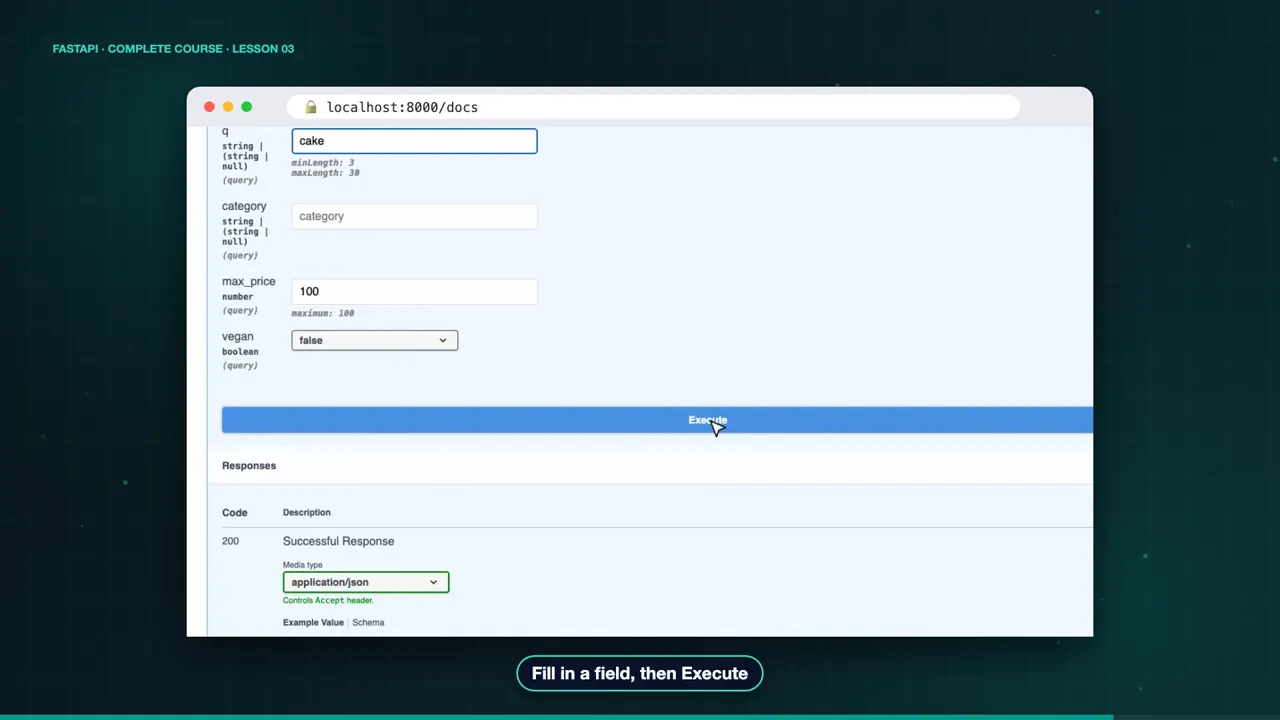
The docs list every query parameter, with its type, its default, and its rules. Try it out, fill in a few fields, and execute.
The complete code for this lesson
Here is the full main.py exactly as it runs at the end of this lesson. Save it, install FastAPI with pip install "fastapi[standard]", and start it with fastapi dev main.py, then open http://127.0.0.1:8000/docs.
from typing import Annotated

from fastapi import FastAPI, Query

app = FastAPI(title="Sweet Crumbs API")

MENU = [
    {"name": "Chocolate Cake", "category": "cakes", "price": 18.0},
    {"name": "Carrot Cake", "category": "cakes", "price": 16.0},
    {"name": "Sourdough Loaf", "category": "breads", "price": 7.0},
    {"name": "Baguette", "category": "breads", "price": 4.5},
    {"name": "Croissant", "category": "pastries", "price": 4.0},
    {"name": "Cinnamon Roll", "category": "pastries", "price": 5.0},
    {"name": "Flat White", "category": "drinks", "price": 5.0},
    {"name": "Hot Chocolate", "category": "drinks", "price": 4.5},
]


@app.get("/menu/")
def list_menu(skip: int = 0, limit: int = 3):
    return MENU[skip : skip + limit]


@app.get("/search/")
def search_menu(
    q: Annotated[str | None, Query(min_length=3, max_length=30)] = None,
    category: str | None = None,
    max_price: Annotated[float, Query(gt=0, le=100)] = 100,
    vegan: bool = False,
):
    results = [
        item
        for item in MENU
        if (q is None or q.lower() in item["name"].lower())
        and (category is None or item["category"] == category)
        and item["price"] <= max_price
    ]
    return {"query": q, "category": category, "vegan": vegan, "results": results}
Summary
So query parameters are optional when they have a default, and Query adds validation. Maya's customers can now search and page through the menu. But how do they place an order? In the next lesson, we send data in the request body. See you there.
Key takeaways- Query parameters live after the “?”
- A default value makes them optional
- Query(…) adds validation rules