
What Is LangGraph
Graphs of steps.
LangGraph is a Python library for building apps as a graph of steps. Each step is a small function. Arrows decide which step runs next. It's made by the LangChain team, and it's how you build agents you fully control.
- A Python library
- A graph of steps
- Agents you control
A graph, simply
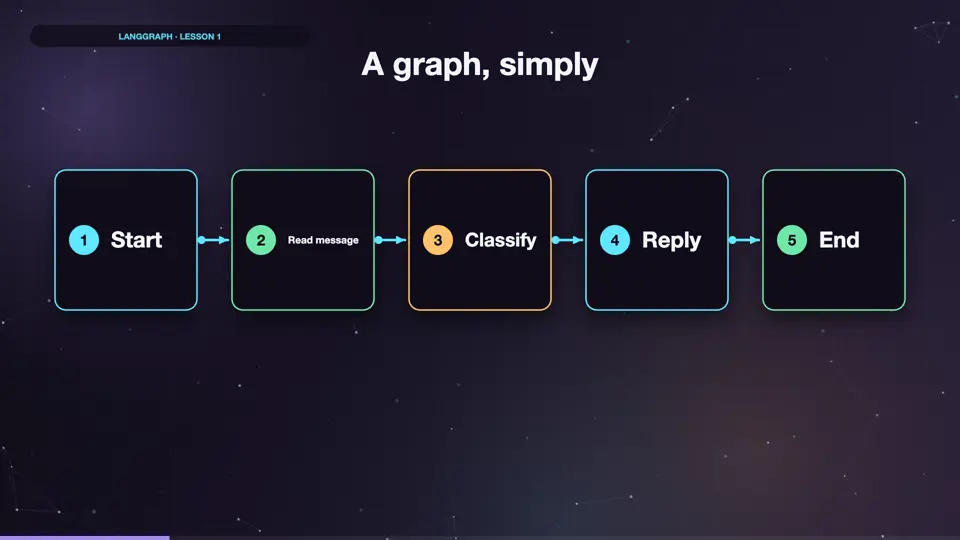
Here's a tiny graph. It starts. A step reads the customer's message. A second step decides what kind of request it is. A third writes a reply. Then it ends. LangGraph runs these steps for you, in the right order, passing information between them.
- Start
- Read message
- Classify
- Reply
- End
Why a graph?
Why not just write a normal Python function? Graphs make it easy to branch, loop, and run steps in parallel. They can pause and wait for a human. They remember where they got to, even after a restart. And you can see their shape, as a diagram.
| key | value |
|---|---|
| Branch and loop | choose paths |
| Pause | wait for a human |
| Remember | save progress |
| See it | draw the graph |
Summary
LangGraph builds apps as graphs of small steps, joined by arrows. Graphs can branch, loop, pause, and remember. Next, setting up.
Key takeaways- Steps are functions
- Arrows choose what's next
- Branch, loop, pause