
Human in the Loop
Why pause.
Some actions shouldn't happen without a person checking first. Refunding money. Placing a large order. Emailing a customer. Human in the loop means the graph pauses, waits for a decision, and then carries on.
- Some actions need a person
- Pause and wait
- Then carry on
Pause and resume
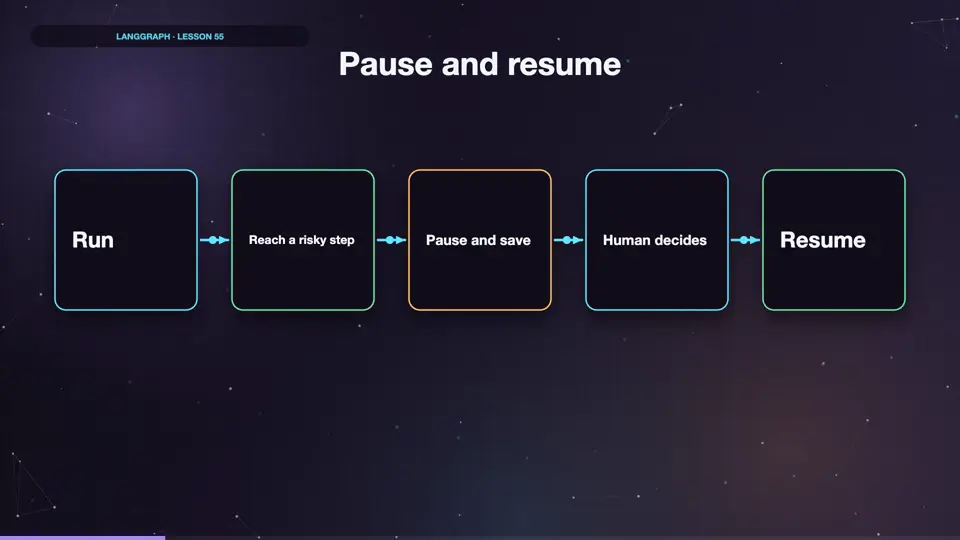
Here's the pattern. The graph runs until it reaches a risky step. It pauses, and saves its state with the checkpointer. A person reviews the request, maybe hours later. Then the graph resumes, with their decision.
- Run
- Reach a risky step
- Pause and save
- Human decides
- Resume
What a human can do
At a pause, a person can do several things. Approve the action. Reject it. Edit it, like changing an amount. Or answer a question the agent asked. LangGraph supports all of these.
| key | value |
|---|---|
| Approve | go ahead |
| Reject | don't do it |
| Edit | change the details |
| Answer | give information |
Summary
Human in the loop pauses a graph at risky steps, waits for a decision, and resumes. It needs a checkpointer to save the paused state. Next, the interrupt function.
Key takeaways- Pause at risky steps
- Saved by the checkpointer
- Resume with a decision