
Removing Things from Images
Inpainting.
There's a scratch on the protective glass in front of camera three, and the conveyor rail crosses every shot. Replacing the glass means stopping the line. Is there a way to paint over the problem, so that the model never sees it?
- A scratch on the glass
- The line can't stop
- Paint over the problem
Repairing a damaged image
We make a smooth test photo, so that we know exactly what the true image looks like. The mask marks the damage, a long scratch, and a round blot. In the damaged copy, those pixels turn white. Inpaint fills them, working in from the edges of each hole, and taking the surrounding pixels into account. We measure the error only inside the holes. Run it. Over four and a half thousand pixels were repaired. The error falls from about a hundred and twenty five, to only about three. On the left is the damage, and on the right is the repair. The scratch is gone.
import cv2
import numpy as np

x, y = np.meshgrid(np.arange(400), np.arange(300))
clean = (120 + 60 * np.sin(x / 40) + 50 * np.cos(y / 30)).astype(np.uint8)
photo = cv2.merge([clean, clean, clean])

mask = np.zeros((300, 400), np.uint8)
cv2.line(mask, (30, 40), (370, 260), 255, 6)
cv2.circle(mask, (300, 80), 22, 255, -1)

damaged = photo.copy()
damaged[mask > 0] = 255
fixed = cv2.inpaint(damaged, mask, 5, cv2.INPAINT_TELEA)

hole = mask > 0
print("Pixels repaired:", hole.sum())
print("Error before:", round(np.abs(damaged[hole] * 1.0 - photo[hole]).mean(), 1))
print("Error after: ", round(np.abs(fixed[hole] * 1.0 - photo[hole]).mean(), 1))
cv2.imwrite("chart.png", np.hstack([damaged, fixed]))Pixels repaired: 4528 Error before: 124.5 Error after: 3.0
Where inpainting works
It's strongest on thin damage, in smooth areas, because there's enough nearby information to rebuild it. Scratches, dust, and sensor glare are perfect. It's useful for removing a date stamp or a watermark from training images. But it can only guess at what's hidden. It can't recover a bruise that was behind that blot. So never use a repaired image as evidence that something was or wasn't there.
From copying pixels to generating them
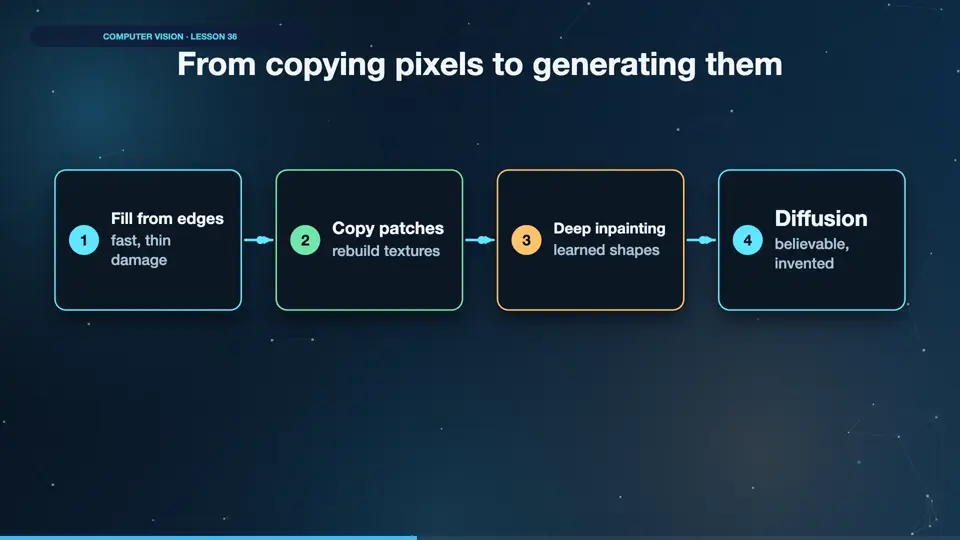
This classic method copies from nearby pixels. Patch methods search the whole image for a matching piece, and they can rebuild simple textures. Deep models learn what the world looks like. And diffusion can invent a believable new scene. Each step looks better, and each step moves further from the truth. For measurement, choose the simplest repair that works.
- Fill from edgesfast, thin damage
- Copy patchesrebuild textures
- Deep inpaintinglearned shapes
- Diffusionbelievable, invented
Fix it in training too
If you repair images in production, then repair your training images in exactly the same way. Otherwise the model will see marks that it never met during training. Inpainting can leave a soft patch, and a network may learn to depend on it. Keep the repair step in one shared function, and compare your results with and without it. If it doesn't improve the score, then remove it, because each step in a pipeline is another thing that can break.
Summary
Repair small damage, and never trust a repair as evidence. Next, how do you measure whether two images really look alike?
Key takeaways- Inpainting fills small holes
- It's only a guess
- Simple is more honest