
From Classifier to Detector
Sliding across the belt.
Our bruise model takes a small crop, and says yes or no. But the camera sees the whole belt. Before modern detectors arrived, the method was simple and brutal. Slide your classifier across the entire image, and test every position.

- Our model takes small crops
- The camera sees the whole belt
- Slide across every position
A sliding window
We train our tiny bruise classifier as before. Then we take a full belt image, with three bruised apples in it. Unfold cuts the image into overlapping forty eight pixel windows, every twelve pixels. And we run all of them as one big batch. For each true bruise, we check if any nearby window scored above point five. Run it. Over eighteen hundred windows were tested, and all three bruises were found. That's a working detector, built from a tiny classifier. The price is that we ran the network eighteen hundred times, per image. And that's exactly the waste that detectors like YOLO were designed to remove.
import numpy as np
import torch
from belt import belt
from patch import net, make, train

torch.manual_seed(0)
model = train(net(), *make(1500), epochs=8)
torch.manual_seed(0)

img, _, spots = belt(n=8, seed=11, bruises=3)
x = torch.tensor(img / 255, dtype=torch.float32).permute(2, 0, 1)[None]
tiles = x.unfold(2, 48, 12).unfold(3, 48, 12)
rows, cols = tiles.shape[2:4]
p = model(tiles.permute(2, 3, 1, 4, 5, 0).reshape(-1, 3, 48, 48)).softmax(1)[:, 1].reshape(rows, cols).detach()

found = [(a, b, r) for a, b, r in spots
         if p[max(0, (b - 24) // 12 - 2):(b - 24) // 12 + 3, max(0, (a - 24) // 12 - 2):(a - 24) // 12 + 3].max() > .5]
print(f"Windows checked: {rows * cols}")
print(f"Bruises found: {len(found)} of {len(spots)}")Windows checked: 1850 Bruises found: 3 of 3
Also uses belt.py
import numpy as np
import cv2

def belt(n=7, seed=1, size=(480, 640), bruises=2, light=1.0):
    """Draw a simulated conveyor belt of apples. Returns the image and the true boxes."""
    rng = np.random.default_rng(seed)
    h, w = size
    img = np.full((h, w, 3), (70, 75, 80), np.uint8)
    img = cv2.add(img, rng.normal(0, 6, img.shape).clip(0, 30).astype(np.uint8))
    boxes, spots, taken = [], [], []
    while len(boxes) < n:
        r = int(rng.integers(32, 48))
        x, y = int(rng.integers(r + 5, w - r - 5)), int(rng.integers(r + 5, h - r - 5))
        if any((x - a) ** 2 + (y - b) ** 2 < (r + c + 8) ** 2 for a, b, c in taken):
            continue
        taken.append((x, y, r))
        red = int(rng.integers(150, 225))
        cv2.circle(img, (x, y), r, (35, 40, red), -1, cv2.LINE_AA)
        cv2.circle(img, (x - r // 3, y - r // 3), r // 4, (90, 90, min(255, red + 30)), -1, cv2.LINE_AA)
        boxes.append((x - r, y - r, x + r, y + r))
    for x, y, r in taken[:bruises]:
        cv2.ellipse(img, (x + r // 3, y + r // 4), (r // 3, r // 4), 20, 0, 360, (25, 45, 70), -1, cv2.LINE_AA)
        spots.append((x, y, r))
    img = cv2.GaussianBlur(img, (3, 3), 0)
    return np.clip(img * light, 0, 255).astype(np.uint8), boxes, spots
Also uses patch.py
import numpy as np
import cv2
import torch

def make(n, seed=0, light=1.0, bruise_rate=0.5):
    """Simulated apple photos. Label 1 means bruised."""
    rng = np.random.default_rng(seed)
    X, y = [], []
    for _ in range(n):
        img = np.full((48, 48, 3), (70, 75, 80), np.uint8)
        c = tuple(int(v) for v in rng.integers(19, 30, 2))
        r = int(rng.integers(15, 20))
        cv2.circle(img, c, r, (35, 40, int(rng.integers(150, 225))), -1, cv2.LINE_AA)
        bad = rng.random() < bruise_rate
        if bad:
            at = (c[0] + int(rng.integers(-8, 9)), c[1] + int(rng.integers(-8, 9)))
            cv2.circle(img, at, int(rng.integers(3, 6)), (25, 45, 70), -1, cv2.LINE_AA)
        img = img * light + rng.normal(0, 8, img.shape)
        X.append(img.clip(0, 255) / 255)
        y.append(int(bad))
    X = torch.tensor(np.array(X), dtype=torch.float32).permute(0, 3, 1, 2)
    return X, torch.tensor(y)

def net():
    return torch.nn.Sequential(
        torch.nn.Conv2d(3, 16, 3, padding=1), torch.nn.ReLU(), torch.nn.MaxPool2d(2),
        torch.nn.Conv2d(16, 32, 3, padding=1), torch.nn.ReLU(), torch.nn.MaxPool2d(2),
        torch.nn.Flatten(), torch.nn.Linear(32 * 12 * 12, 2))

def train(model, X, y, epochs=8):
    opt = torch.optim.Adam(model.parameters(), lr=2e-3)
    for _ in range(epochs):
        for i in torch.randperm(len(X)).split(64):
            loss = torch.nn.functional.cross_entropy(model(X[i]), y[i])
            opt.zero_grad(); loss.backward(); opt.step()
    return model

def accuracy(model, X, y):
    return (model(X).argmax(1) == y).float().mean().item()
From sliding to YOLO
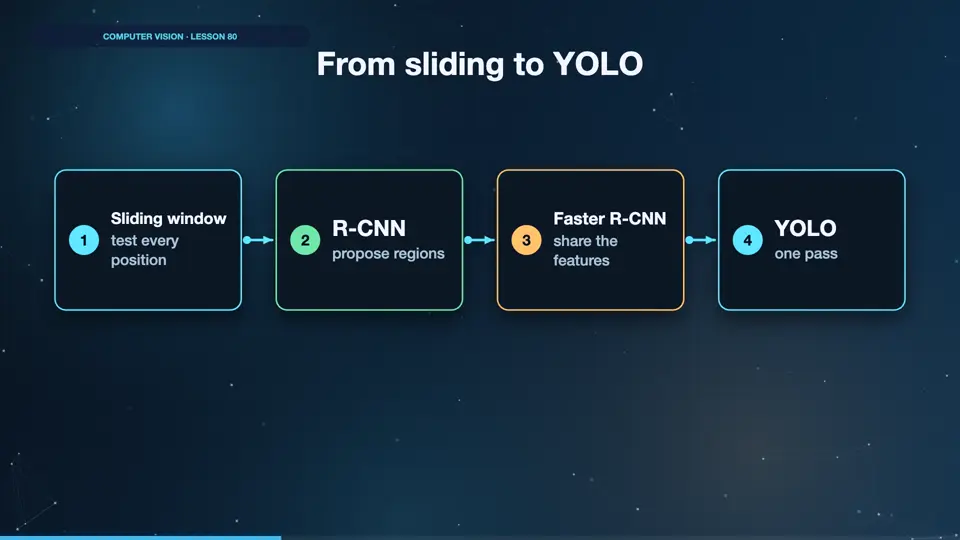
The history of detection is about removing that repetition. Sliding windows tested every position. RCNN proposed about two thousand likely regions. Fast RCNN shared the features between them. And YOLO asked one question once, predicting all boxes in a single pass. That's where the name comes from. You only look once.
- Sliding windowtest every position
- R-CNNpropose regions
- Faster R-CNNshare the features
- YOLOone pass
Summary
Sliding works, but it repeats itself, and that's why YOLO exists. Next, search your images by what's in them.
Key takeaways- Unfold makes all the windows
- Run them as one batch
- YOLO removes the repetition