
Finding Circles and Lines
The Hough transform.
How do you find a circle in an image, when its outline is broken, and half of it's hidden? In nineteen sixty two, Paul Hough patented a brilliant idea. Don't search for shapes. Let every edge pixel vote for the shapes that it could belong to, and then count the votes.
- Find a broken circle
- 1962: Paul Hough
- Every edge pixel votes
How the votes work
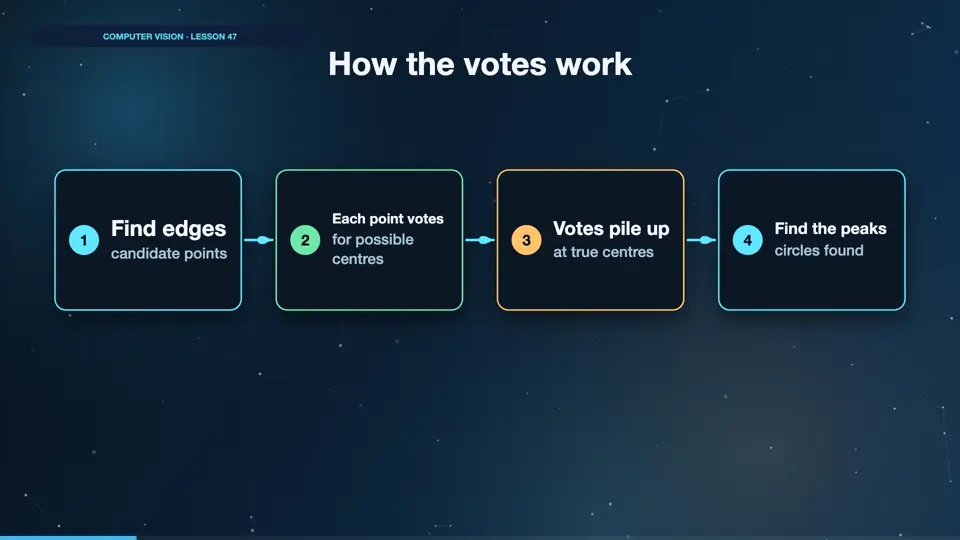
Every edge point could be part of many circles. So it casts one vote for each possible centre. Lots of different points vote for the same true centre, so a tall peak appears there. Find the peaks, and you've found your circles. It even works with gaps, as the remaining points still vote.
- Find edgescandidate points
- Each point votesfor possible centres
- Votes pile upat true centres
- Find the peakscircles found
Finding apples as circles
We use the saturation channel, as apples stand out from the grey belt there. The min dist setting stops two circles from sitting on top of each other. And the radius limits narrow down the search. Param two is the vote threshold. Lower finds more, and may include false ones. Run it. Six circles found, out of six apples, and each one's been drawn onto the image. Getting those settings right took a little tuning, and that's the honest cost of classic methods.
import cv2
from belt import belt

img, boxes, _ = belt(n=6)
sat = cv2.medianBlur(cv2.cvtColor(img, cv2.COLOR_BGR2HSV)[..., 1], 5)

found = cv2.HoughCircles(sat, cv2.HOUGH_GRADIENT, dp=1.2, minDist=60,
                         param1=100, param2=20, minRadius=28, maxRadius=52)

print("Circles found:", found.shape[1], "truth", len(boxes))
for x, y, r in found[0][:6].astype(int):
    cv2.circle(img, (int(x), int(y)), int(r), (0, 255, 0), 3)
cv2.imwrite("circles.png", img)Circles found: 6 truth 6
Also uses belt.py
import numpy as np
import cv2

def belt(n=7, seed=1, size=(480, 640), bruises=2, light=1.0):
    """Draw a simulated conveyor belt of apples. Returns the image and the true boxes."""
    rng = np.random.default_rng(seed)
    h, w = size
    img = np.full((h, w, 3), (70, 75, 80), np.uint8)
    img = cv2.add(img, rng.normal(0, 6, img.shape).clip(0, 30).astype(np.uint8))
    boxes, spots, taken = [], [], []
    while len(boxes) < n:
        r = int(rng.integers(32, 48))
        x, y = int(rng.integers(r + 5, w - r - 5)), int(rng.integers(r + 5, h - r - 5))
        if any((x - a) ** 2 + (y - b) ** 2 < (r + c + 8) ** 2 for a, b, c in taken):
            continue
        taken.append((x, y, r))
        red = int(rng.integers(150, 225))
        cv2.circle(img, (x, y), r, (35, 40, red), -1, cv2.LINE_AA)
        cv2.circle(img, (x - r // 3, y - r // 3), r // 4, (90, 90, min(255, red + 30)), -1, cv2.LINE_AA)
        boxes.append((x - r, y - r, x + r, y + r))
    for x, y, r in taken[:bruises]:
        cv2.ellipse(img, (x + r // 3, y + r // 4), (r // 3, r // 4), 20, 0, 360, (25, 45, 70), -1, cv2.LINE_AA)
        spots.append((x, y, r))
    img = cv2.GaussianBlur(img, (3, 3), 0)
return np.clip(img * light, 0, 255).astype(np.uint8), boxes, spotsLines and tilt
The same voting idea finds lines. Here's a simple picture of a conveyor's two edges. We find the edges, then probabilistic Hough returns line segments. We take the median angle. Run it. There are four segments, as each thick line has two edges. And the tilt is about four degrees. That's useful, as you can straighten every image automatically, or warn someone that the camera has shifted.
import cv2
import numpy as np

img = np.full((300, 500), 60, np.uint8)
cv2.line(img, (40, 40), (460, 70), 220, 6)
cv2.line(img, (40, 240), (460, 270), 220, 6)

edges = cv2.Canny(img, 50, 150)
lines = cv2.HoughLinesP(edges, 1, np.pi / 180, threshold=80, minLineLength=200, maxLineGap=10)

angles = [np.degrees(np.arctan2(y2 - y1, x2 - x1)) for x1, y1, x2, y2 in lines.reshape(-1, 4)]
print("Segments found:", len(lines))
print("Belt tilt:", round(float(np.median(angles)), 1), "degrees")Segments found: 4 Belt tilt: 4.1 degrees
Summary
Let the evidence vote, and peaks appear. Next, what about surfaces that have no clear shapes at all? Texture.
Key takeaways- Points vote for shapes
- Peaks are found shapes
- Settings need tuning