
Capstone: Building AppleEye
Bringing it all together.
It's harvest time at Orchard Vision. The owner wants AppleEye running before the first crates arrive. Everything that you've learned comes into this one system. It must find each apple on the belt, grade it, track it, and read each crate label. Let's plan it the way a professional would.
- Harvest is here
- Find, grade, track, read
- Plan it like a professional
The AppleEye pipeline
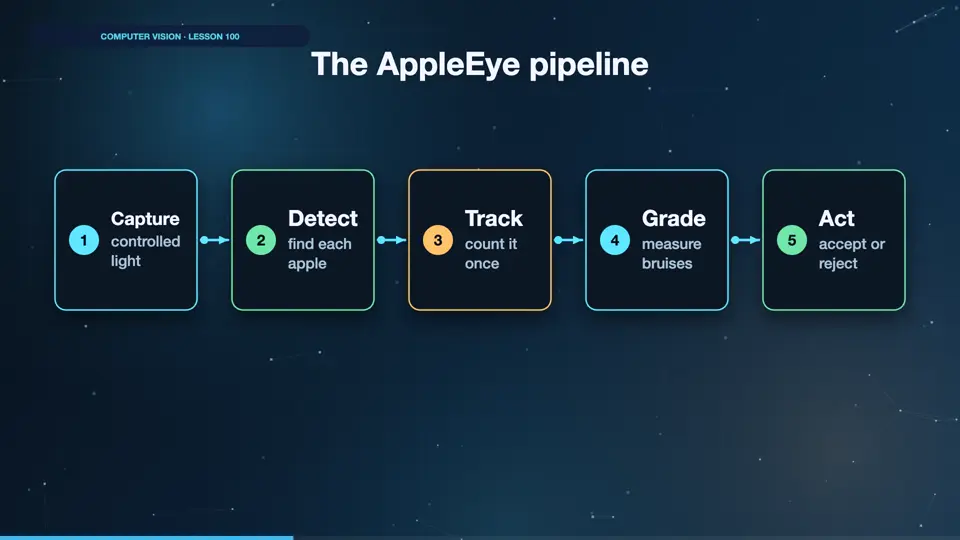
Here's the design. A camera in a closed box with even lights. Detect apples using a small trained model. Track each apple, so that we count it once. Segment and measure bruises. Decide accept or reject. And read the crate label with OCR. Each stage uses the simplest thing that works, and each one can be tested by itself.
- Capturecontrolled light
- Detectfind each apple
- Trackcount it once
- Grademeasure bruises
- Actaccept or reject
A working grader
Here's a complete demonstration, in one program. We simulate a belt with six apples, and two of them are bruised. We find fruit with colour, clean the mask, and find each apple with contours. For each apple, we measure the share of dark pixels, then decide. Green boxes mean accept, and red boxes mean reject. Run it. Six apples seen, two rejected, and it matches the truth exactly. On real apples, a trained detector and segmenter would replace the colour rules. The logic stays the same.
import cv2
import numpy as np
import matplotlib.pyplot as plt

rng = np.random.default_rng(3)
frame = np.full((300, 600, 3), 45, np.uint8)
truth = []
for i in range(6):
    x, y, r = 70 + i * 90, int(rng.integers(90, 210)), int(rng.integers(30, 40))
    cv2.circle(frame, (x, y), r, (205, 35, 35), -1)
    bruised = i in (1, 4)
    if bruised:
        cv2.circle(frame, (x + 10, y - 8), r // 3, (95, 55, 40), -1)
    truth.append(bruised)

hsv = cv2.cvtColor(frame, cv2.COLOR_RGB2HSV)
fruit = (hsv[..., 1] > 80).astype(np.uint8) * 255
fruit = cv2.morphologyEx(fruit, cv2.MORPH_CLOSE, np.ones((9, 9), np.uint8))
contours, _ = cv2.findContours(fruit, cv2.RETR_EXTERNAL, cv2.CHAIN_APPROX_SIMPLE)

out = frame.copy()
results = []
for c in sorted(contours, key=lambda c: cv2.boundingRect(c)[0]):
    x, y, w, h = cv2.boundingRect(c)
    mask = np.zeros(fruit.shape, np.uint8)
    cv2.drawContours(mask, [c], -1, 255, -1)
    dark = ((hsv[..., 2] < 150) & (mask > 0)).sum() / (mask > 0).sum()
    grade = "reject" if dark > 0.03 else "accept"
    results.append(grade == "reject")
    colour = (255, 80, 80) if grade == "reject" else (80, 255, 120)
    cv2.rectangle(out, (x, y), (x + w, y + h), colour, 2)

plt.figure(figsize=(9, 4.5)); plt.imshow(out); plt.axis("off")
plt.tight_layout(); plt.savefig("appleeye.png", dpi=110)
print("Apples seen:", len(results))
print("Rejected:", sum(results))
print("Matches the truth:", results == truth)Apples seen: 6 Rejected: 2 Matches the truth: True
What is it worth?
Now, the sum that gets a project approved. How many bad apples did we miss before, and now? How many good ones did we waste? We put a price on each kind of error, over a sixty day season. Run it. That's a clear number that the owner can act on. Always end a vision project with a figure like this. It's what turns a clever demo into a funded product.
apples_per_day, days = 100000, 60
missed_before, wasted_before = 0.15, 0.06
missed_after, wasted_after = 0.04, 0.03
bruise_rate, miss_cost, waste_cost = 0.04, 2.0, 0.25

def cost(miss, waste):
    bad = apples_per_day * bruise_rate * miss * miss_cost
    lost = apples_per_day * (1 - bruise_rate) * waste * waste_cost
    return (bad + lost) * days

saved = cost(missed_before, wasted_before) - cost(missed_after, wasted_after)
print(f"Saved over the season: ${saved:,.0f}")Saved over the season: $96,000
Launch checklist
Before going live, test with real apples, on real days. Run it next to the human sorters for a week, and compare. Have a safe default if the camera fails. Log the images that it's unsure about. Clean the lens on a schedule. And retrain when the fruit variety or the season changes. A vision system is a living thing.
Summary
You've designed a complete vision system, from photons to dollars. The owner's delighted, and the tired sorters can finally get some rest. Now it's time for your final exam.
Key takeaways- Simple stages, each testable
- Put a price on results
- Launch beside humans first