
MCP · Lesson 103 of 120
Project: The Plan
Northwind help server.
Let's build a complete project. A help server for Northwind Bikes, that any AI assistant can use. It looks up and cancels orders, shares policies, offers reply templates, and runs over HTTP.
- A help server
- Orders, policies, prompts
- Any assistant
The files
DB dot py holds the orders database. Server dot py creates the server and the order tool. Cancel dot py adds a careful cancel tool. Library dot py adds policy resources. Prompts dot py adds reply templates. And app dot py puts it all together.
- db.py: orders database
- server.py: server + order tool
- cancel.py: confirmed cancel
- library.py: policy resources
- prompts.py: reply templates
- app.py: everything together
The build
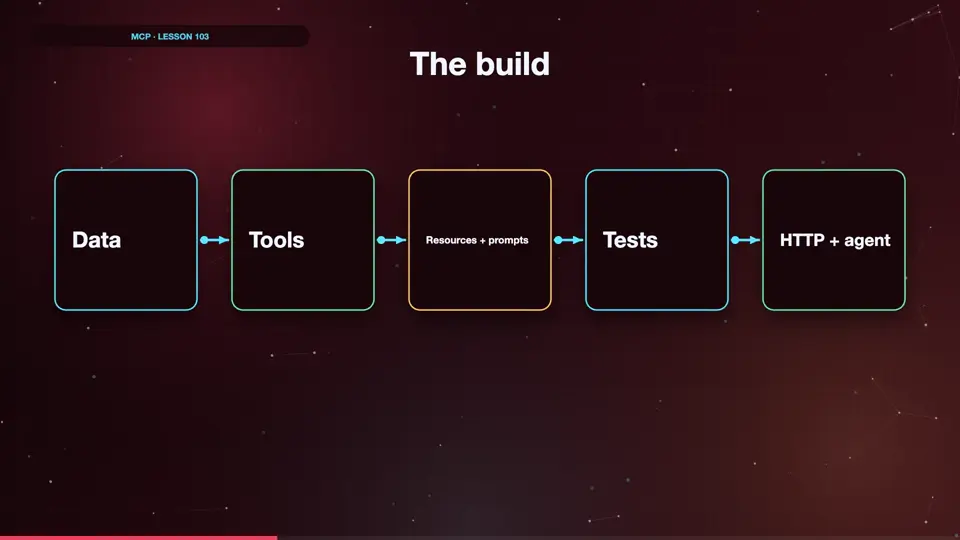
We start with the data. Then the tools, resources, and prompts. Then tests. Then we serve it over HTTP. And finally, an agent uses it.
- Data
- Tools
- Resources + prompts
- Tests
- HTTP + agent
Summary
We'll build the Northwind help server, file by file. Next, the data.
Key takeaways- Six files
- Tools, resources, prompts
- Tests and HTTP
Next up: Project: Data — orders in SQLite