
Authentication
OAuth for HTTP servers.
A public HTTP server must know who's calling. MCP uses O Auth. The user logs in with an authorization server, the client gets a token, and sends it with every request.
- Who's calling?
- OAuth
- A token per request
The OAuth flow
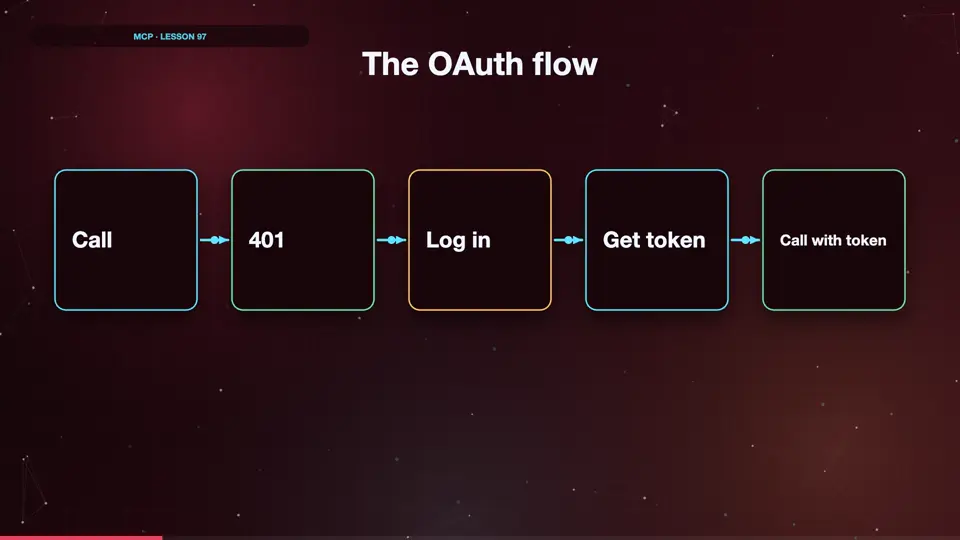
The client calls without a token, and gets a four oh one. The server says which authorization server to use. The user logs in there, and the client gets a token. Then it calls again, with the token.
- Call
- 401
- Log in
- Get token
- Call with token
secure_server.py
The verifier checks each token, and returns who it belongs to, with their scopes. Here it accepts one demo token. Auth settings name the authorization server, this server's URL, and the scopes every caller needs.
from mcp.server.auth.provider import AccessToken
from mcp.server.auth.settings import AuthSettings
from mcp.server.mcpserver import MCPServer
URL = "http://127.0.0.1:8765/mcp"

class DemoVerifier:
    async def verify_token(self, token):
        if token != "sam-token-123":  # real servers check a signed token
            return None
        return AccessToken(token=token, client_id="support-app",
                           scopes=["orders:read"], resource=URL)

mcp = MCPServer("northwind", token_verifier=DemoVerifier(), auth=AuthSettings(
    issuer_url="https://auth.northwind.example", resource_server_url=URL,
    required_scopes=["orders:read"], validate_token_resource=True))
@mcp.tool()
def order_status(order_id: int) -> str:
    """Look up an order."""
return "shipped"With and without a token
Each request sends a bearer token in a header. We try a made up token, and the real one. Run it. The made up token is refused, and the real one gets an answer.
import asyncio, httpx2
from mcp import Client
from mcp.client.streamable_http import streamable_http_client
from secure_server import mcp, URL
from serve import start

start(mcp.streamable_http_app())

async def ask(token):
    http = httpx2.AsyncClient(headers={"Authorization": f"Bearer {token}"})
    try:
        async with Client(streamable_http_client(URL, http_client=http)) as client:
            return (await client.call_tool("order_status", {"order_id": 1042})).content[0].text
    except Exception:
        return "refused"

for token in ["made-up-token", "sam-token-123"]:
print(token, "->", asyncio.run(ask(token)))made-up-token -> refused sam-token-123 -> shipped
Also uses serve.py
import threading, time, uvicorn

def start(app, port=8765):
    """Run a web app in the background, just for demos."""
    threading.Thread(target=uvicorn.run, args=(app,), daemon=True,
                     kwargs={"port": port, "log_level": "critical"}).start()
    time.sleep(1)
Also uses secure_server.py
from mcp.server.auth.provider import AccessToken
from mcp.server.auth.settings import AuthSettings
from mcp.server.mcpserver import MCPServer
URL = "http://127.0.0.1:8765/mcp"

class DemoVerifier:
    async def verify_token(self, token):
        if token != "sam-token-123":  # real servers check a signed token
            return None
        return AccessToken(token=token, client_id="support-app",
                           scopes=["orders:read"], resource=URL)

mcp = MCPServer("northwind", token_verifier=DemoVerifier(), auth=AuthSettings(
    issuer_url="https://auth.northwind.example", resource_server_url=URL,
    required_scopes=["orders:read"], validate_token_resource=True))
@mcp.tool()
def order_status(order_id: int) -> str:
    """Look up an order."""
    return "shipped"
Summary
HTTP servers use O Auth tokens. Verify every token, and require the right scopes. Next, validating input.
Key takeaways- OAuth
- Bearer token
- Scopes