
MCP · Lesson 25 of 120
Asking the User
Elicitation.
Sometimes a tool needs the user's answer in the middle of its work. Are you sure you want to cancel? Elicitation lets the server ask, through the client, and wait for the reply.
- Tool needs an answer
- Ask through the client
- Then continue
How it works
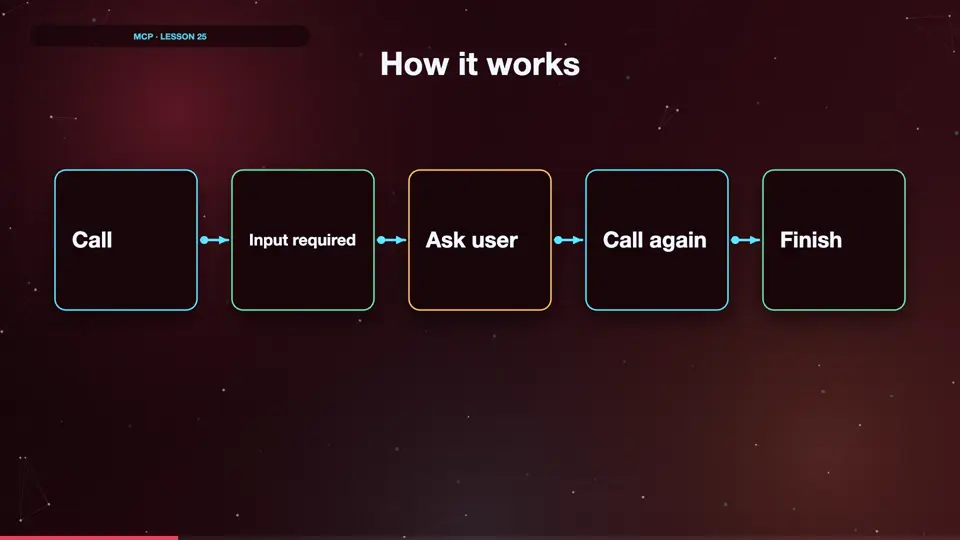
The client calls the tool. The tool returns input required, with a question and a small schema. The client asks the user. It calls the tool again, with the answer attached. And this time, the tool finishes.
- Call
- Input required
- Ask user
- Call again
- Finish
Confirming a cancel
Input responses holds any answers. If there's none yet, we return input required, with a question and a yes or no schema. The client's elicitation callback answers yes. Run it. The user is asked, and the order is cancelled.
elicit.pypython
from mcp.server.mcpserver import MCPServer, Context
from mcp_types import InputRequiredResult, ElicitRequest, ElicitRequestFormParams, ElicitResult
from tester import call

mcp = MCPServer("shop")
YES_NO = {"type": "object", "properties": {"ok": {"type": "boolean"}}, "required": ["ok"]}

@mcp.tool()
async def cancel_order(order_id: int, ctx: Context) -> str:
    """Cancel an order, after the user confirms."""
    answer = (ctx.input_responses or {}).get("confirm")
    if answer is None:
        ask = ElicitRequestFormParams(message=f"Cancel order {order_id}?", requested_schema=YES_NO)
        return InputRequiredResult(input_requests={"confirm": ElicitRequest(params=ask)})
    return "cancelled" if answer.action == "accept" and answer.content["ok"] else "kept"

async def user_says_yes(ctx, params):
    print("asked:", params.message); return ElicitResult(action="accept", content={"ok": True})
print(call(mcp, "cancel_order", {"order_id": 1042}, elicitation_callback=user_says_yes).content[0].text)
Output
asked: Cancel order 1042?
cancelled
Also uses tester.py
import asyncio
from mcp import Client

def call(server, tool, args=None, **options):
    async def go():
        async with Client(server, **options) as client:
            return await client.call_tool(tool, args or {})
    return asyncio.run(go())

def tools(server):
    async def go():
        async with Client(server) as client:
            return (await client.list_tools()).tools
return asyncio.run(go())Summary
A tool can ask the user a question by returning input required, and finish when the answer comes back. Next, when the user says no.
Key takeaways- InputRequiredResult
- Ask the user
- Retry with answer
Next up: Saying No — decline and cancel