
Multimodal RAG
Images too.
Manuals have diagrams. Price lists come as photos. Multimodal RAG handles images as well as text. The simplest way is to describe each image with a vision model, and index the description as text.
- Diagrams and photos
- Images and text
- Describe, then index
Images into the index
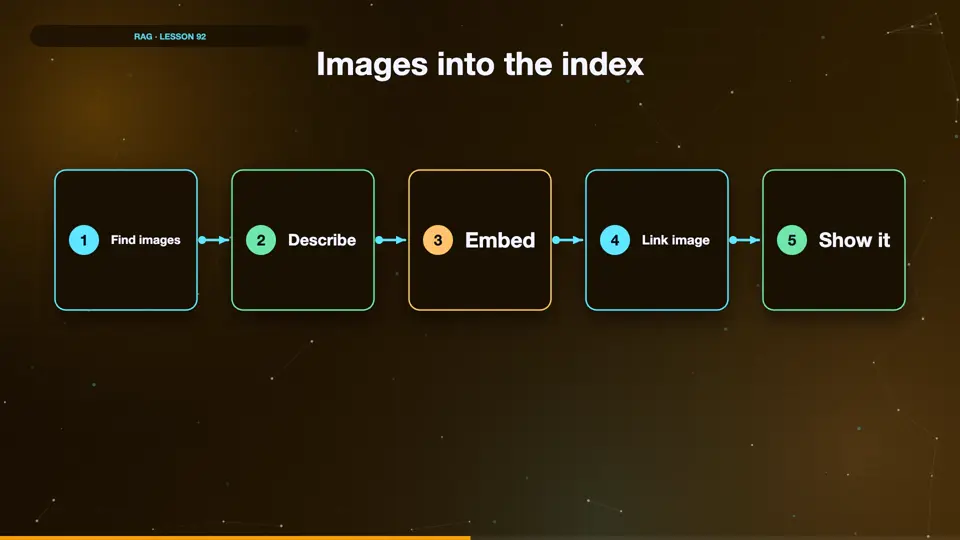
Find the images in your documents. A vision model writes a detailed description of each one. We embed the description, like any chunk. We keep a link to the image. And when it's retrieved, we can show the image itself.
- Find images
- Describe
- Embed
- Link image
- Show it
Two approaches
Describing images as text works with any embedding model. Multimodal embedding models can put images and text in the same space directly. And Gemini can read a whole PDF page, images included, when you send it.
| key | value |
|---|---|
| Describe | then embed text |
| Multimodal embeddings | images and text |
| Gemini | reads PDF pages |
| Keep | a link to the image |
Summary
Multimodal RAG describes images as text, or embeds them directly, so diagrams become searchable. Next, the advanced quiz.
Key takeaways- Describe images
- Embed descriptions
- Show the image