
RAG · Lesson 96 of 120
Keeping the Index Fresh
Re-index what changed.
Help pages change every week. Rebuilding the whole index each time is slow and costly. Instead, we fingerprint each file, and re-index only the files whose fingerprint changed.

- Pages change
- Don't rebuild everything
- Re-index what changed
Finding changed files
A fingerprint is a hash of the file's text. Any change to the text changes the hash. We save the hashes, edit the shipping page, and compare. Run it. Only the shipping page needs re-indexing.
fresh.pypython
import hashlib, shutil
from pathlib import Path

shutil.copytree("data/rag/northwind", "docs")
fingerprint = lambda p: hashlib.sha256(p.read_bytes()).hexdigest()
before = {p.name: fingerprint(p) for p in Path("docs").glob("*.md")}

page = Path("docs/shipping.md")
page.write_text(page.read_text().replace("£4.99", "£5.49"))

after = {p.name: fingerprint(p) for p in Path("docs").glob("*.md")}
changed = [name for name in after if before.get(name) != after[name]]
print("changed:", changed)
print("unchanged:", len(after) - len(changed), "files")
Output
changed: ['shipping.md']
unchanged: 13 files
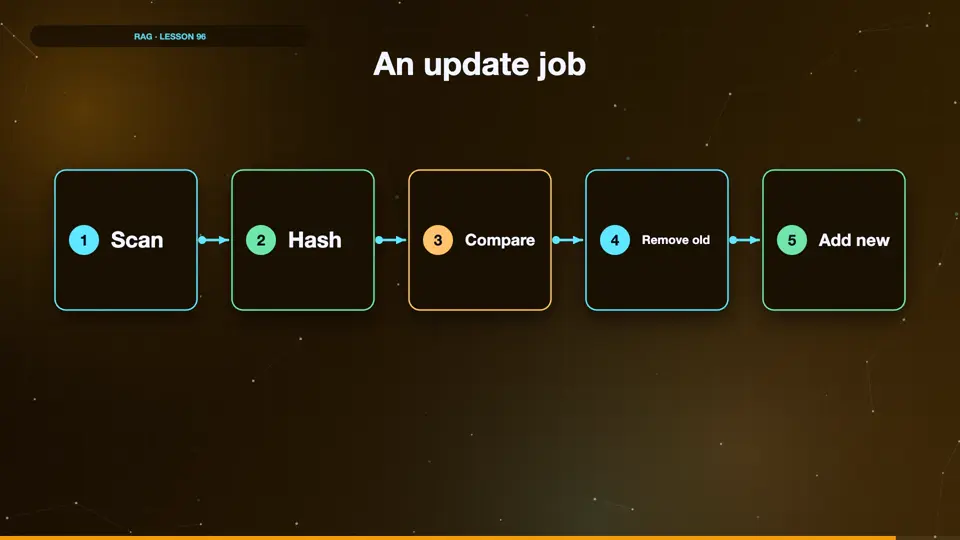
An update job
On a schedule, scan the documents. Hash each file. Compare with the saved hashes. Remove old chunks for changed or deleted files. And add new chunks for changed and new files.
- Scan
- Hash
- Compare
- Remove old
- Add new
Summary
Fingerprint files with a hash, and re-index only what changed. Next, duplicates and old versions.
Key takeaways- Hash each file
- Compare
- Re-index changes
Next up: Duplicates and Old Versions — one truth