
RAG · Lesson 104 of 120
Feedback
Thumbs up and down.
Customers can tell us when an answer helped. A thumbs up or down button is simple, and every thumbs down is a free bug report. We store each vote with the question and the answer.
- Thumbs up or down
- Free bug reports
- Store each vote
Storing feedback
We store votes in SQLite, with the question, the answer, and helpful as one or zero. Then we list the questions with thumbs down. Run it. Two answers got a thumbs down, and those are the ones to study.
feedback.pypython
import sqlite3

db = sqlite3.connect("feedback.db")
db.execute("CREATE TABLE IF NOT EXISTS votes (question TEXT, answer TEXT, helpful INT)")

votes = [("How much is UK delivery?", "£4.99, free over £50.", 1),
         ("Can I pay monthly?", "I don't know.", 0),
         ("When is York open?", "Monday to Saturday, 9am to 5:30pm.", 1),
         ("What is the APR?", "I don't know.", 0)]
db.executemany("INSERT INTO votes VALUES (?, ?, ?)", votes)

print("thumbs down:")
for q, a in db.execute("SELECT question, answer FROM votes WHERE helpful = 0"):
    print("  ", q, "->", a)
Output
thumbs down:
   Can I pay monthly? -> I don't know.
   What is the APR? -> I don't know.
Closing the loop
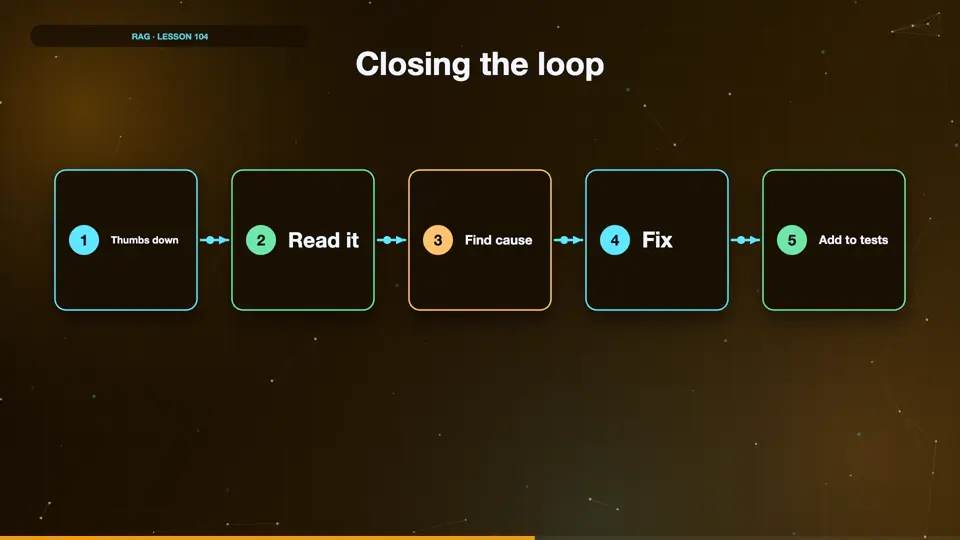
A customer votes thumbs down. We read the question and answer. We find the cause, often retrieval. We fix it. And we add the question to the test set, so it never breaks again.
- Thumbs down
- Read it
- Find cause
- Fix
- Add to tests
Summary
Store every vote, read the thumbs down, and turn each one into a fix and a test. Next, the production quiz.
Key takeaways- Store votes
- Study thumbs down
- Add to tests
Next up: Production Quiz — test yourself