
The Agent Loop from Scratch
Build a real agent in twenty lines.
This is the most important lesson of the course. You'll build an agent yourself, with no framework, in about twenty lines. Once you've done this, every agent framework will just look like a nicer version of the same thing.
- The most important lesson
- No framework
- Twenty lines
The agent loop
To see the mechanics clearly, we'll use a stand-in model which replays a fixed script. The loop has one job. Ask the model for a decision. If it's an answer, we're finished. If it's a tool call, run it, and add the result to the messages. And stop after six steps, whatever happens. Run it. Step one, it reads the order. Step two, it checks stock. Then it answers. That's an agent.
import json
from scripted import Scripted
from shop import get_order, check_stock, refund

TOOLS = {"get_order": get_order, "check_stock": check_stock, "refund": refund}

def run_agent(model, goal, max_steps=6):
    messages = [{"role": "user", "text": goal}]
    for step in range(1, max_steps + 1):
        decision = model.ask(messages)
        if decision["type"] == "answer":
            return decision["text"]
        tool, args = decision["name"], decision["args"]
        result = TOOLS[tool](**args)
        print(f"Step {step}: {tool}({args}) -> {json.dumps(result)[:58]}")
        messages.append({"role": "tool", "text": json.dumps(result)})
    return "I couldn't finish. Passing this to a person."

model = Scripted([
    {"type": "tool", "name": "get_order", "args": {"order_id": "C09"}},
    {"type": "tool", "name": "check_stock", "args": {"item": "Helmet"}},
    {"type": "answer", "text": "Your helmet was delivered, and it's out of stock."},
])
print(run_agent(model, "Can I swap the helmet from order C09?"))Step 1: get_order({'order_id': 'C09'}) -> {"item": "Helmet", "price": 95, "status": "delivered", "da
Step 2: check_stock({'item': 'Helmet'}) -> {"item": "Helmet", "in_stock": 0}
Your helmet was delivered, and it's out of stock.Also uses shop.py
ORDERS = {
    "A17": {"item": "Carbon wheelset", "price": 640, "status": "delivered", "days_ago": 12},
    "B42": {"item": "Chain", "price": 28, "status": "shipped", "days_ago": 2},
    "C09": {"item": "Helmet", "price": 95, "status": "delivered", "days_ago": 45},
}
STOCK = {"Carbon wheelset": 3, "Chain": 14, "Helmet": 0}
REFUNDS = []

def get_order(order_id: str) -> dict:
    """Look up one order by its ID, such as A17."""
    return ORDERS.get(order_id, {"error": f"No order {order_id}"})

def check_stock(item: str) -> dict:
    """Return how many of an item are in stock."""
    return {"item": item, "in_stock": STOCK.get(item, 0)}

def refund(order_id: str, amount: float) -> dict:
    """Refund money to the customer for an order."""
    REFUNDS.append((order_id, amount))
    return {"refunded": amount, "order_id": order_id}
Also uses scripted.py
class Scripted:
    """A stand-in model that replays a fixed list of replies."""
    def __init__(self, replies):
        self.replies = list(replies)
        self.calls = 0

    def ask(self, messages):
        self.calls += 1
        return self.replies.pop(0)
What just happened
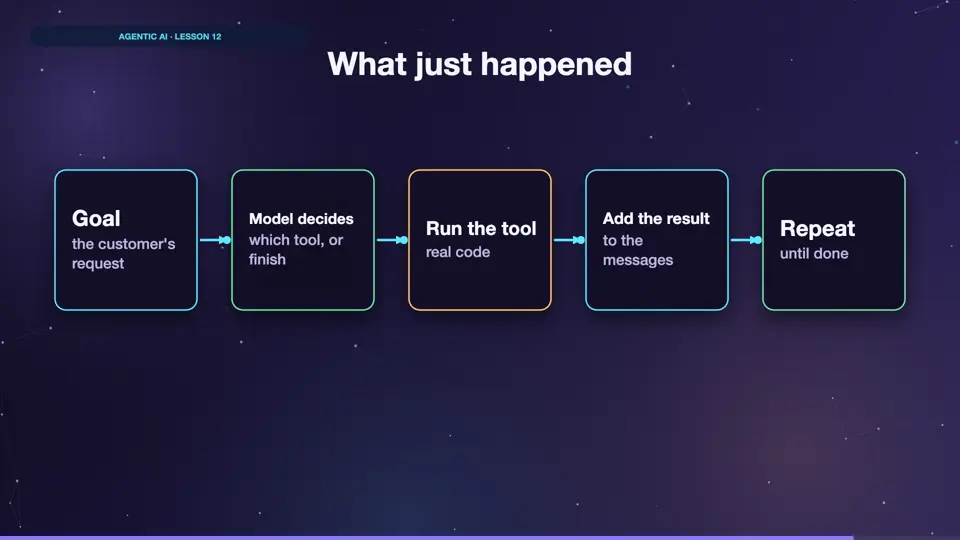
Look at what the loop gave us. The goal arrives. The model picks a tool. The result joins the messages. The model sees the new information, and picks again. It's the messages list that holds it all together. There's no other magic.
- Goalthe customer's request
- Model decideswhich tool, or finish
- Run the toolreal code
- Add the resultto the messages
- Repeatuntil done
Notice what makes this safe
Three lines in that code really matter. The step limit stops it from running forever. Tools come from a fixed dictionary, so the model can't call anything else. And it hands over to a person, rather than failing silently. Those three ideas protect every production agent.
Summary
You've just built an agent from scratch. Next, we plug in a real model, and watch it make its own choices.
Key takeaways- The loop is about twenty lines
- Messages hold everything
- Limit steps, allowlist tools