
Human in the Loop
Pause for approval.
A customer asks for a six hundred and forty dollar refund. The agent is ready. But the founder's rule is firm. Anything above fifty dollars needs a person. And that person's at lunch. The agent has to stop, wait for an hour or a week, and then carry on exactly where it left off. A normal program can't do that. A graph can.
- A $640 refund request
- A person must approve
- Wait, then carry on
How pausing works
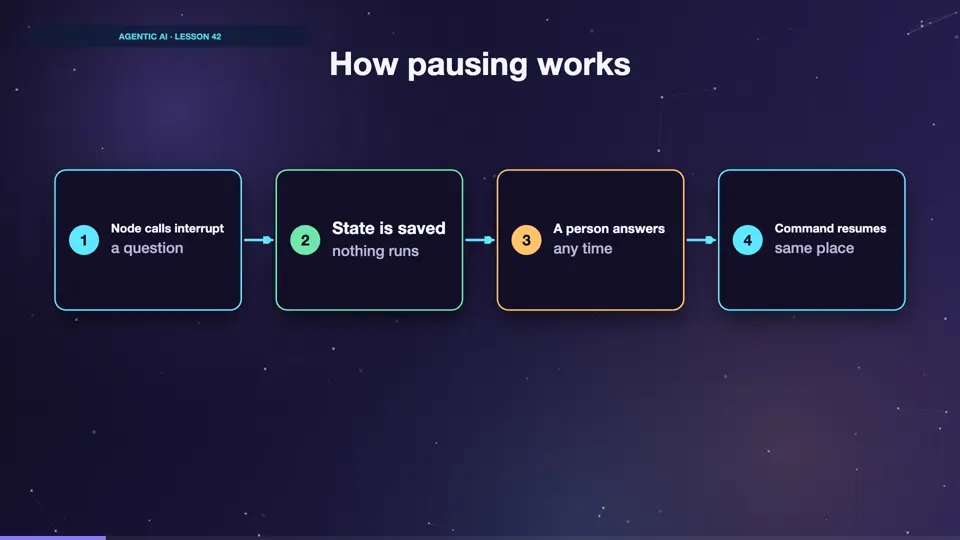
When a node calls interrupt, the graph saves everything, and it stops. No process keeps running, and nothing costs money. It might be a week later when your app sends in the answer. The graph then loads its state, and continues.
- Node calls interrupta question
- State is savednothing runs
- A person answersany time
- Command resumessame place
Approval for big refunds
The approve node checks the amount. Small ones go straight through. For big ones, it calls interrupt, with the question that it wants to ask. Then the code continues, using the answer. Look at the bottom. The small refund just completes. The big one pauses, and we show the question. Then Command resume sends the answer. Run it. Twenty dollars was auto approved. For six hundred and forty, it stopped and waited. Then it finished as soon as a person said yes. This is one of the most important patterns in the course.
from typing import TypedDict
from langgraph.checkpoint.memory import InMemorySaver
from langgraph.graph import StateGraph, START, END
from langgraph.types import Command, interrupt

class State(TypedDict):
    order: str
    amount: float
    result: str

def approve(state):
    if state["amount"] <= 50:
        return {"result": "auto-approved"}
    answer = interrupt(f"Refund ${state['amount']} on {state['order']}?")
    return {"result": "approved" if answer == "yes" else "rejected"}

def pay(state):
    if state["result"] == "rejected":
        return {"result": "No refund sent"}
    return {"result": f"Paid ${state['amount']} ({state['result']})"}

g = StateGraph(State)
g.add_node("approve", approve)
g.add_node("pay", pay)
g.add_edge(START, "approve")
g.add_edge("approve", "pay")
g.add_edge("pay", END)
app = g.compile(checkpointer=InMemorySaver())

small = {"configurable": {"thread_id": "t1"}}
print(app.invoke({"order": "B42", "amount": 20}, small)["result"])

big = {"configurable": {"thread_id": "t2"}}
paused = app.invoke({"order": "A17", "amount": 640}, big)
print("Waiting for a person:", paused["__interrupt__"][0].value)

print(app.invoke(Command(resume="yes"), big)["result"])Paid $20 (auto-approved) Waiting for a person: Refund $640 on A17? Paid $640 (approved)
A detail that matters
One thing that surprises people. When a graph resumes, it restarts the node from the top, and doesn't continue from the line with the interrupt. So anything before the interrupt runs a second time. Keep interrupts at the start of a node, or put side effects in a later node. Never charge a card before an interrupt.
Summary
Pause, save, wait, and resume. A human can now approve anything. But approving is only one option. People can also edit what the agent proposes.
Key takeaways- interrupt pauses the graph
- Command(resume) continues
- Nodes restart from the top