
TypeScript · Lesson 3 of 120
How It Runs
Tsc, then node.
Browsers and Node don't run TypeScript directly. First, the TypeScript compiler, called TSC, checks your types. Then it removes them, and writes plain JavaScript. That JavaScript is what runs.
- Check the types
- Remove them
- Run the JavaScript
From TypeScript to output
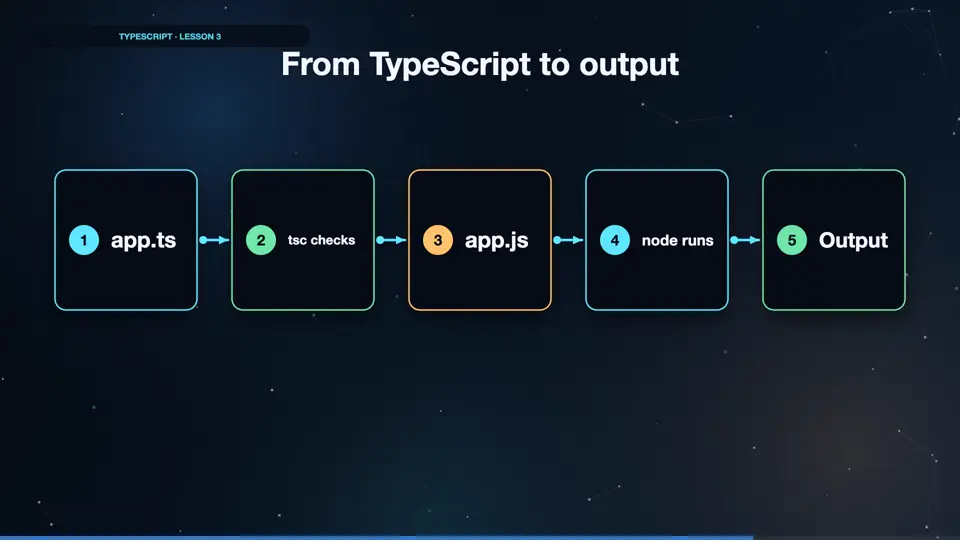
You write app dot TS. TSC checks it. If the types are fine, it writes app dot JS. Node runs that file. And you see the output.
- app.ts
- tsc checks
- app.js
- node runs
- Output
Types disappear
This TypeScript has a type on the name. Run it. The compiler checked it, removed the type, and Node ran the JavaScript that was left.
app.tstypescript
const name: string = "Northwind Bikes";
console.log("Welcome to", name);
Output
Welcome to Northwind Bikes
Setting up
Install Node from nodejs dot org. Then install TypeScript with NPM. Run NPXTSC to check and compile. And use an editor like VS Code, which understands TypeScript out of the box.
| key | value |
|---|---|
| Node | nodejs.org |
| TypeScript | npm install typescript |
| Compile | npx tsc |
| Editor | VS Code |
Summary
TSC checks your types, removes them, and Node runs the JavaScript. Next, your first program.
Key takeaways- tsc checks
- Types removed
- node runs
Next up: Your First Program — hello, TypeScript