Ask a model about Riverside Books' return policy, and it will guess, because it has never seen the shop's documents. Retrieval augmented generation, or RAG, fixes this. Find the relevant documents first, then give them to the model with the question.
Let's see the problem. We ask a plain model what express delivery costs at Riverside Books. Run it. The model has never seen the shop's price list, so it either invents a price, or says it doesn't know. Either way, it's not the real price, which is five pounds ninety nine.
no_rag.pypython
from langchain.chat_models import init_chat_modelmodel = init_chat_model("google_genai:gemini-flash-lite-latest", temperature=0)q = "How much does express delivery cost at Riverside Books? One sentence."print(model.invoke(q).text)
Output
Express delivery at Riverside Books costs $9.99 for orders under $50 and is free for
orders of $50 or more.
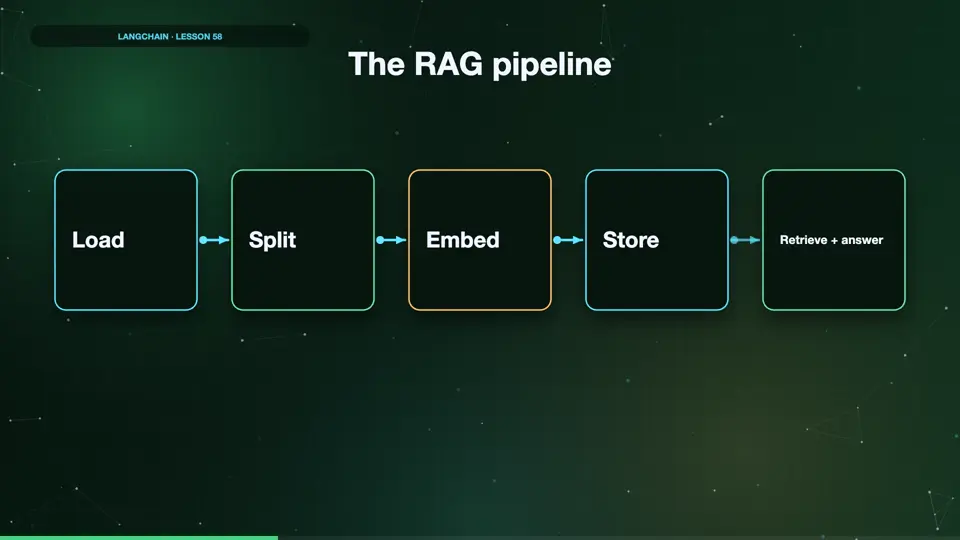
RAG has two phases. First, indexing, done once. Load the documents, split them into chunks, turn each chunk into an embedding, and store them in a vector store. Then, at question time, find the chunks most similar to the question, and put them in the prompt. The model answers from real text.
RAG retrieves relevant documents and gives them to the model, so answers come from your real data. Next, the document object that holds each piece of text.