So far, we fill a template, then pass the result to the model, by hand. LangChain lets you connect the steps with the pipe symbol, a vertical bar. The result is called a chain.
Prompt, pipe, model, creates a chain. When we invoke the chain with the template's inputs, it fills the prompt, and passes the messages straight into the model. Run it. One call, two steps. The output of each step becomes the input of the next.
pipe.pypython
from langchain.chat_models import init_chat_modelfrom langchain_core.prompts import ChatPromptTemplatemodel = init_chat_model("google_genai:gemini-flash-lite-latest", temperature=0)prompt = ChatPromptTemplate.from_template("Give one fun fact about {topic} in one sentence.")chain = prompt | modelreply = chain.invoke({"topic": "owls"})print(type(reply).__name__)print(reply.text)
Output
AIMessage
Owls cannot move their eyeballs in their sockets, which is why they have to swivel their
entire heads up to 270 degrees to look around!
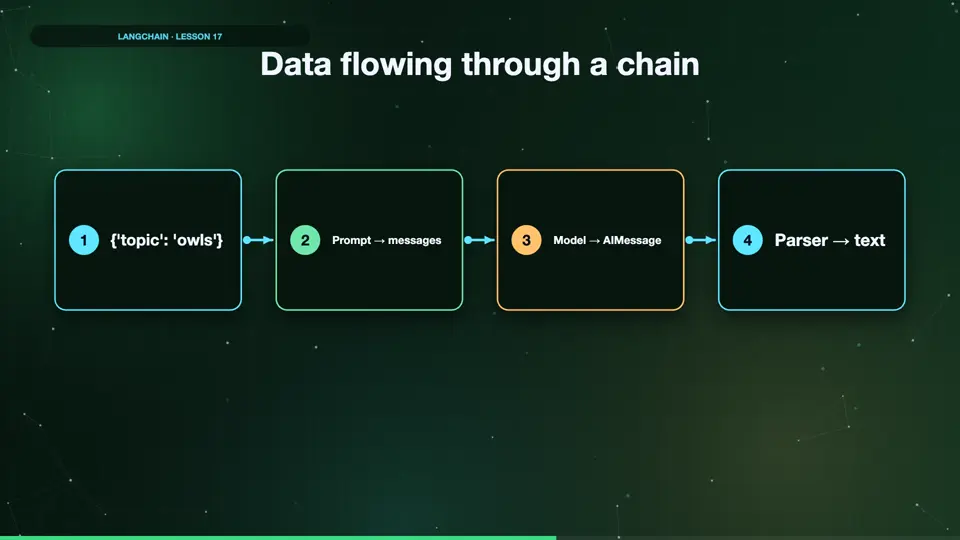
Think of a chain as a pipeline. A dictionary of inputs goes in. The prompt template turns it into messages. The model turns the messages into an AI message. And, as we'll see next, a parser can turn that into plain text. Each piece only needs to understand what's handed to it.