
The DOM
The page as objects.
When the browser loads a page, it turns the HTML into a tree of objects, called the DOM, the Document Object Model. Every tag becomes an object that JavaScript can read and change. Change the object, and the page changes on screen.
- HTML becomes a tree
- Every tag is an object
- Change it, the page changes
A tree of elements
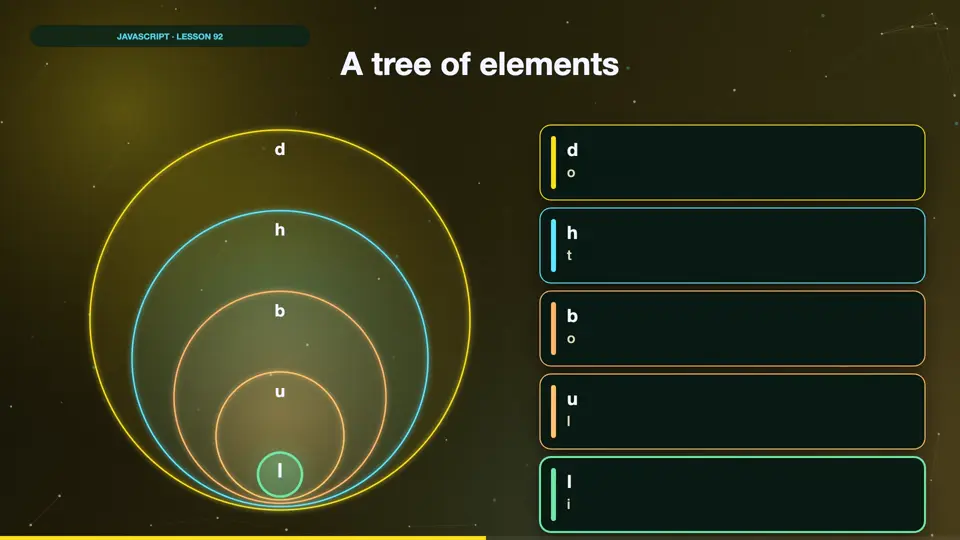
The document is the root. Inside it is the html element, which holds head and body. The body holds the heading, a list, and the list holds its items. Each one is a node in the tree, with a parent, and maybe children.
Exploring the tree
Document dot body is the body element. Children gives its child elements, and we count them. The list's children are its items. Here we add the count to the heading, and colour the first item, using the tree. You can see the result on the page.
<link rel="stylesheet" href="style.css">
<h1>Shopping</h1>
<ul>
  <li>Bread</li>
  <li>Milk</li>
  <li>Eggs</li>
</ul>
<script>
  const list = document.body.children[1];
  const heading = document.body.children[0];
  heading.textContent += ` (${list.children.length} items)`;
  list.children[0].style.color = "crimson";
</script>
Also uses style.css
body{font-family:-apple-system,Helvetica,Arial,sans-serif;margin:22px;font-size:21px;color:#1d1d1f;background:#fafafa}
h1{font-size:34px;margin:0 0 14px} h2{font-size:26px;margin:0 0 10px}
button{font-size:19px;padding:9px 18px;border-radius:9px;border:0;background:#f7df1e;color:#111;font-weight:600;margin:4px 6px 4px 0}
input{font-size:19px;padding:8px 10px;border:2px solid #bbb;border-radius:8px}
li{margin:5px 0} .box{padding:14px;border-radius:12px;background:#fff;border:2px solid #ddd;margin:8px 0}
.done{text-decoration:line-through;color:#999} small{color:crimson;display:block;font-size:16px} .big{font-size:64px;font-weight:800}Summary
The DOM is the page as a tree of objects. JavaScript can walk the tree, and changing an element changes the page. Next, finding elements easily with query selector.
Key takeaways- Document Object Model
- A tree of nodes
- Change it, page updates