
Event Delegation
One listener for many.
Imagine a list with a hundred items, each with a delete button. You could add a hundred listeners. Or you could add one listener to the list itself. Events bubble up from the element that was clicked, through its parents. So the parent hears every click inside it.
- A hundred buttons
- A hundred listeners?
- Or one on the parent
Delete buttons
Each item has a delete button. Instead of a listener on every button, we add just one to the list. Closest finds the nearest ancestor that matches, so we know which item the button belongs to, and we remove it. New items work too, without any extra listeners. We clicked the delete button on the second item, so Milk is gone.
<link rel="stylesheet" href="style.css">
<ul id="list">
  <li>Bread <button class="del">x</button></li>
  <li>Milk <button class="del">x</button></li>
  <li>Eggs <button class="del">x</button></li>
</ul>
<script>
  const list = document.querySelector("#list");

  list.addEventListener("click", (e) => {
    if (!e.target.matches(".del")) return;
    e.target.closest("li").remove();
  });
</script>
Also uses style.css
body{font-family:-apple-system,Helvetica,Arial,sans-serif;margin:22px;font-size:21px;color:#1d1d1f;background:#fafafa}
h1{font-size:34px;margin:0 0 14px} h2{font-size:26px;margin:0 0 10px}
button{font-size:19px;padding:9px 18px;border-radius:9px;border:0;background:#f7df1e;color:#111;font-weight:600;margin:4px 6px 4px 0}
input{font-size:19px;padding:8px 10px;border:2px solid #bbb;border-radius:8px}
li{margin:5px 0} .box{padding:14px;border-radius:12px;background:#fff;border:2px solid #ddd;margin:8px 0}
.done{text-decoration:line-through;color:#999} .big{font-size:64px;font-weight:800}
Also uses actions.json
[{"click": "li:nth-child(2) .del"}]Bubbling
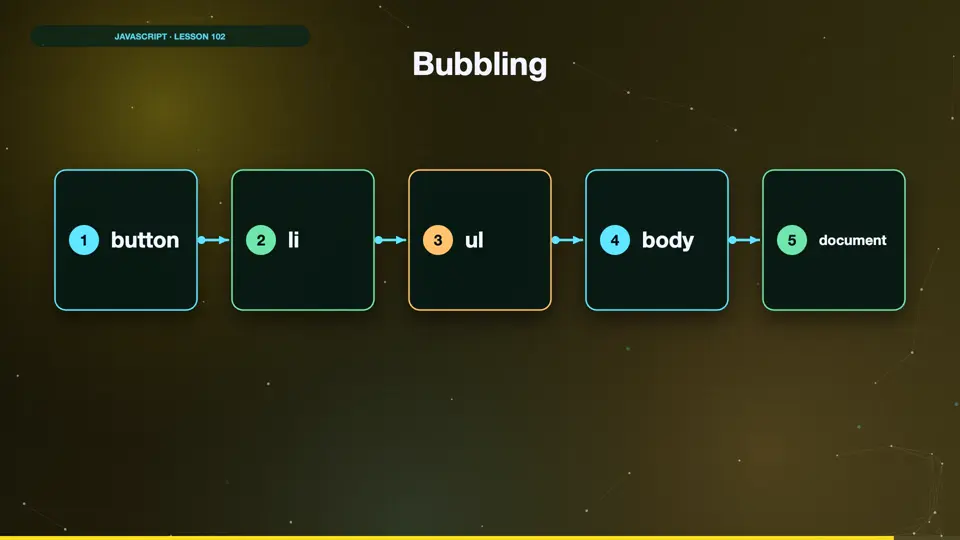
When you click the button, the click event fires on the button first. Then it bubbles up to the list item, then the list, then the body, and finally the document. Any of them can listen. That's why one listener on the list can handle every button inside it.
- button
- li
- ul
- body
- document
Summary
Events bubble up through parents, so one listener on a container can handle all its children. Use matches and closest to see what was clicked. Next, practice with a quiz app.
Key takeaways- Events bubble up
- One parent listener
- matches / closest