
Joining Three Tables
Order lines with book details.
Each order can contain several books. Those details live in the order items table. One row per book, per order, with a quantity. But order items only stores the book's ID. To see the title and the price, we need to join to books as well.
- An order holds several books
- order_items: one row per book
- Titles and prices live in books
How the tables connect
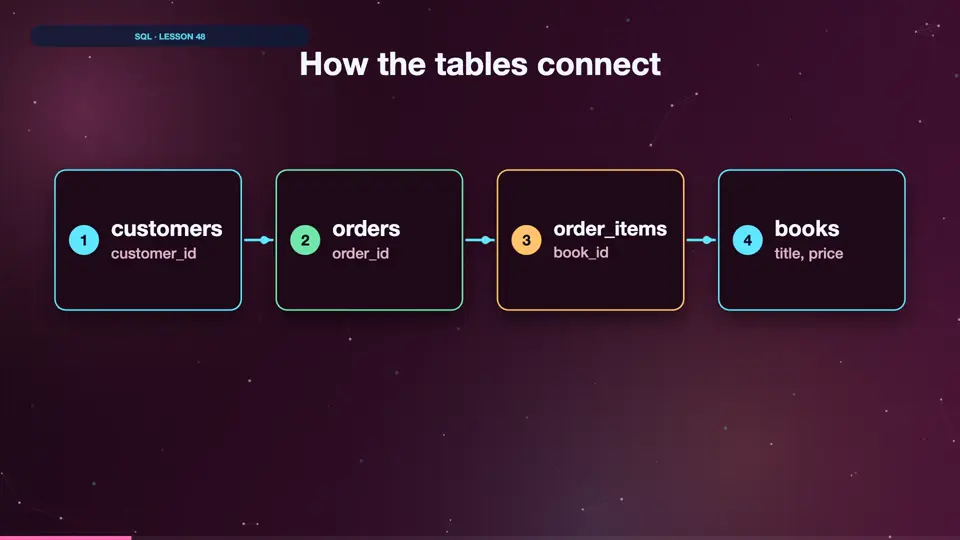
Here's the map of Helen's shop. A customer places orders. Each order has order items. And each order item points to one book. Every arrow is a pair of matching ID columns. To travel from a customer to a book title, you follow the arrows, one join at a time.
- customerscustomer_id
- ordersorder_id
- order_itemsbook_id
- bookstitle, price
Order lines with titles
Let's start with two tables. Order items, joined to books on the book ID. Now each line shows the title, the quantity, and the price. Run it. Order one thousand and one had two different books. Order one thousand and three had two copies of Wild Coast.
SELECT oi.order_id,
       b.title,
       oi.quantity,
       b.price
FROM order_items AS oi
JOIN books AS b ON b.book_id = oi.book_id
ORDER BY oi.order_id
LIMIT 4;┌──────────┬──────────────────┬──────────┬───────┐ │ order_id │ title │ quantity │ price │ ├──────────┼──────────────────┼──────────┼───────┤ │ 1001 │ Stars Over Lagos │ 1 │ 9.99 │ │ 1001 │ Startup Stories │ 1 │ 19.99 │ │ 1002 │ Spice Roads │ 1 │ 27.99 │ │ 1003 │ Wild Coast │ 2 │ 11.49 │ └──────────┴──────────────────┴──────────┴───────┘
Four tables in one query
Now let's go all the way, from a customer to the titles they bought. Just add one join after another. Each join has its own on, linking the new table to one already in the query. Run it. Tara Brown bought three books, across her two orders.
SELECT c.first_name,
       c.last_name,
       b.title
FROM customers AS c
JOIN orders      AS o  ON o.customer_id = c.customer_id
JOIN order_items AS oi ON oi.order_id   = o.order_id
JOIN books       AS b  ON b.book_id     = oi.book_id
WHERE c.first_name = 'Tara' AND c.last_name = 'Brown';┌────────────┬───────────┬──────────────────┐ │ first_name │ last_name │ title │ ├────────────┼───────────┼──────────────────┤ │ Tara │ Brown │ Stars Over Lagos │ │ Tara │ Brown │ Startup Stories │ │ Tara │ Brown │ Spice Roads │ └────────────┴───────────┴──────────────────┘
Tips for many joins
A few tips when joining several tables. Follow the arrows, one table at a time. Give every table a short alias. Line up your joins, so they're easy to read. And if a result looks wrong, remove the last join, and check again.
Summary
You can chain as many joins as you need. Each one adds a table, with its own on. Next, using joins to answer money questions.
Key takeaways- One JOIN per table
- Each has its own ON
- Follow the arrows